7 Warning Signs: How to Fire Your Web Designer
Last Updated: July 2, 2026
Choosing the right website provider is essential for your business’s online success — but knowing when it’s time to walk away is just as important. Poor communication, outdated technology, missed deadlines, and a lack of innovation can quietly damage your website’s performance and your brand’s credibility. When your provider can’t support your goals, fails to maintain your site properly, or leaves you dealing with technical glitches and limited functionality, the consequences add up quickly.
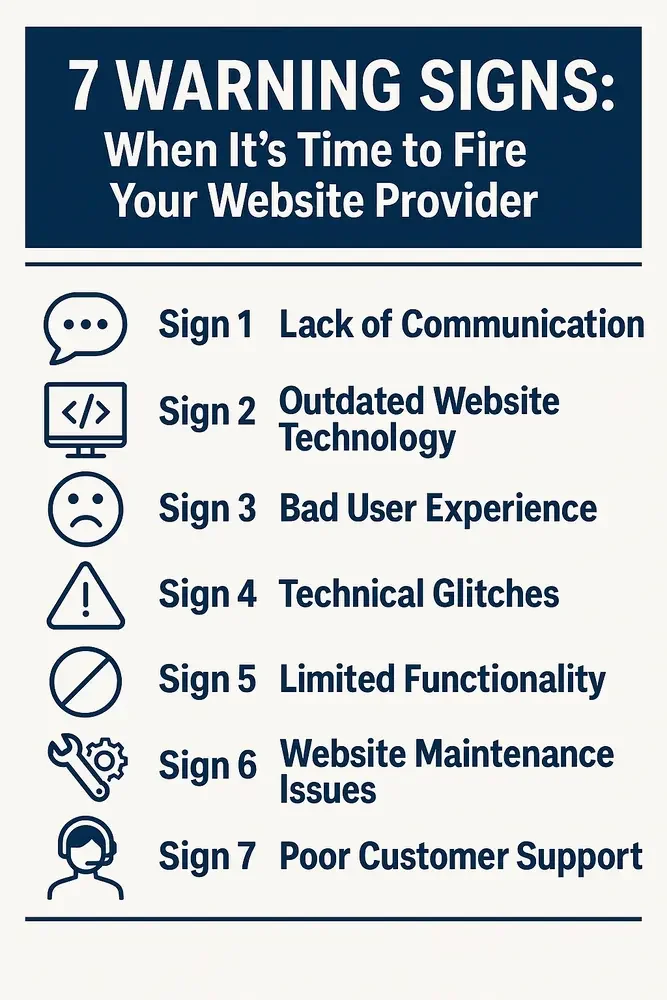
This guide breaks down the seven major warning signs that signal it’s time to fire your web designer and move on. Understanding these red flags early can save you time, money, and frustration — while helping you choose a web partner who actually supports your growth.
Table of Contents
Introduction
Your website provider should understand your business goals and keep your site running well. If they no longer do that, and you keep seeing poor communication, outdated technology, bad user experience, technical glitches, limited functionality, neglected maintenance, or weak support, that is how to know it is time to fire your web designer and move to a better-fit partner. For business owners and decision-makers responsible for website performance, those problems usually lead to slower growth, a weaker online presence, and wasted time and money.
Many businesses end up dealing with weak communication and missed expectations. When a designer avoids questions, it is often a sign that they are not fully committed. These issues hold back growth and make it harder to keep a strong online presence.
Old tech, weak support, and outdated processes also point to deeper problems. You get more glitches and slower pages. You may also deal with missing website features or tools that should already be standard. If you feel like this is you, it may be time to consider a switch.
For property management companies, the cost shows up in search first — property management SEO rests on page speed, clean site structure, and pages someone actually maintains, so a neglected build quietly slides out of the results owners are already searching.
Once you've replaced a provider who let those fundamentals slide, our property management SEO blueprint walks through rebuilding site structure, keywords, and technical health step by step.
Catching these problems early helps you protect your site and choose a provider that brings clarity and predictable performance. This guide covers the seven signs that show it might be time to move on, from communication issues and UX problems to technical errors, missing functionality, poor maintenance, and weak customer support.
Sign 1: Lack of Communication
A website partnership depends on steady back-and-forth. When your provider does not reach out or explain things in a way that makes sense, the entire process slows down. You may start to feel like you are chasing them for updates you should not have to ask for.
Delayed communication creates confusion inside your own business. If you need to meet a deadline and cannot get a straight answer, your plans get pushed out. You may hold off on campaigns or new offers because you are unsure if your site can support the changes in time.
Some providers only reply when something breaks. Others reply with short messages that do not tell you what is happening. You want a partner who keeps things clear and checks in before issues grow. The goal is to make sure you never feel left out of your own project.
Ask yourself a few simple questions:
Do they answer emails in a reasonable amount of time
Do they explain things in a way you understand
Do they bring updates before you ask for them
If the answer is no to any of these, communication is likely the source of the frustration.
Good communication shapes the relationship. It sets the tone for every task that follows.
The Importance of Open Lines
Open communication helps both sides stay aligned. It also builds trust.
Why it matters:
Transparency keeps you informed
Feedback helps corrections happen sooner
Faster decisions keep projects moving
How to Assess Communication Levels
Look at how your provider responds and how they keep you updated.
Consider:
Response speed
Clarity
Proactive updates
If these areas fall short, communication may be the problem.
Sign 2: Outdated Website Technology and Web Development
Technology changes often, and your provider should keep your setup up to speed. When they do not, your site becomes slower and harder to run. Small issues start turning into bigger problems.
Old systems might limit the features you can use. You may want to add booking tools, chat options, or checkout upgrades but cannot because your platform is too far behind. Low-cost web design often leads to outdated builds, weak setup decisions, or poor long-term quality. You also risk security trouble if plugins or themes sit untouched for months or years.
Visitors notice when a site feels old. They may not know the tech behind it, but they feel the lag or see things break. That experience makes them lose trust.
A provider who understands modern tools can keep your site in strong shape. They bring solutions that match what people expect today. Modern tech also helps you stay competitive in your market.
Spend time reviewing your current setup with someone who can explain the risks and limits in a clear way. A clear picture helps you decide if staying with your provider is slowing you down.
The Impact on Performance
Signs your tech may be behind:
Slow website performance or loading
Features breaking
Drop in search visibility
A modern setup keeps your site steady across browsers and devices.
Assessing Current Technologies and the Content Management System Used
Take inventory of what your site uses.
Steps that help:
Make a list of your tools
Identify what is outdated
Ask a specialist for input when unsure
Regular checks help you stay ahead.
User experience shapes how people see your business. If your site feels messy or confusing, visitors may assume your business works the same way.
A clean site leads people through the page at a steady pace. If visitors feel lost or see elements shift around, they may close the window and look for another option.
User experience also affects your search visibility. Search engines look at how long people stay on your site and how many pages they visit. If visitors leave early, search engines assume your content is not helpful.
A better experience comes from simple steps. Update your navigation so users do not need to guess. Reduce clutter so your message stands out. Keep your design steady from page to page. Review how it looks on phones and tablets so nothing gets cut off.
To understand where users struggle, watch how they move on your site. Tools such as heatmaps show what they click. Session recordings help you see where they get stuck. These tools reveal issues your provider should address.
If the experience stays rough even after you bring up concerns, your provider might not have the skill or interest to fix it.
Signs of a Poor User Experience
High bounce rates
Hard-to-find information
Pages that do not match in style or layout
Identifying Usability Issues
Use tools such as:
Heatmaps
Session recordings
Gathering User Feedback
Ask visitors to share quick feedback using:
Surveys
Feedback forms
User testing sessions
These insights help you improve the experience over time.
Sign 4: Technical Glitches
Glitches can make your business look unprofessional. A simple broken button can stop leads from reaching you. A slow checkout can cost you sales. When your site goes down, you miss out on traffic and trust.
Some providers only fix things when you push them. Others patch problems instead of solving the real cause. That leads to repeated issues that waste time and attention.
A reliable provider monitors your site often. They look for slow spots, broken links, image problems, or out-of-date tools. They make adjustments before customers feel the impact.
If your site feels like it breaks every few weeks, the system might be held together with old or messy code. This usually happens when web development is rushed by a weak developer or an inattentive web developer.
Keep track of how often issues appear. If you have a list of repeated problems, it may be time to take action. A new provider with stronger skills can give your site a fresh start.
Common Technical Issues
Slow loading
Dead links
Server errors
Diagnosing Persistent Problems
Review your site often. Useful steps:
Finding the root problem helps prevent repeat issues.
Sign 5: Limited Functionality
Your website should support your goals as you grow. If every new idea turns into a struggle, your setup might not be right for your business.
You might want to add new forms, booking tools, learning systems, custom dashboards, or membership areas. If your provider cannot bring these features to life, you may need a new designer or a new web developer to build the functionality your business needs.
A limited site creates extra work. You may rely on manual tasks or external tools because your site cannot handle the job. This leads to confusion and extra steps for your team.
Take time to map out what you want your site to do in the next year. If your current setup cannot support those ideas, switching providers may be part of planning a new website that better supports your future business goals.
Talk through your plans with someone who knows modern platforms. You may find that you have outgrown your current provider because the tools and technology they provide no longer support your vision.
Recognizing When Your Site Falls Short
Look for:
Missed opportunities
User complaints
Competitors offering features you cannot
Exploring Alternatives for a Smooth Transition
When your site cannot keep up, consider:
Open-source platforms
Custom builds
Systems that grow as you grow
Picking the right setup protects long-term performance.
Sign 6: Website Maintenance Issues
A website needs ongoing care for speed, safety, and performance. When maintenance gets ignored, even strong sites start to slip.
A provider should run updates, check plugins, review security logs, watch for broken parts, and verify software licenses so you do not lose access to paid tools or plugins that keep the site running. Keep a backup of your website data for at least 30 days during any provider change. They should also provide access to any licensed tools, confirm who owns stock photos, and make sure you have the database credentials if your site runs on a CMS. If they only take action when you remind them, that practice puts your site at risk.
Outdated plugins can create cracks that hackers use to get in. Old themes might drop features that make your pages break. If you go long enough without updates, parts of your site can stop loading.
Maintenance should follow a clear schedule. Monthly reviews help catch issues early. Quarterly updates keep your tech in good shape. Emergency checks should happen when security alerts appear.
If your provider waits months between updates or avoids talking about maintenance at all, you will likely face larger problems later.
You can ask for a report of past updates to see how often work gets done. A provider who cares about maintenance will have records, notes, or reports ready to share, including backups, site files, and details on the hosting account.
Indicators of Neglected Maintenance
Frequent downtime
Security warnings
Old plugins or themes
Frequency of Updates, Maintenance, and Administrator Access
Your provider should:
Run monthly reviews
Apply updates on a steady schedule
Watch for new vulnerabilities
The Cost of Neglect
Ignoring maintenance can lead to:
Lost data
Declining traffic
Damage to your brand
Regular upkeep helps keep your site reliable.
Sign 7: Poor Customer Support
Support shapes the everyday experience you have with your provider. Even if the work is good, slow or weak website support can make every issue more stressful.
You might send a ticket and get no reply for days. You might get short replies that do not explain the fix. You might get passed between people without clear answers. Poor support gets even riskier when you need help reclaiming access to Google Analytics or Google Ads, along with other website services like google tag manager, during a provider change. All of this adds frustration.
Good support feels steady. You get a quick acknowledgment, a helpful update, and a clear timeline for the fix. You also get someone who explains the problem in simple language.
Support should not feel like a battle. If you dread reaching out because you assume nothing will happen, that is a sign of a broken system.
Look at how many times you had to ask for the same fix. Look at how long each issue took. Look at how clear the replies were. Request a final itemized invoice listing completed work and any remaining deliverables you still need. These details show if support is actually working.
Recognizing Support Response Times
Look for:
Quick acknowledgment
Reasonable resolution time
Assessing Overall Satisfaction
Ask yourself:
Do issues get solved?
Do you feel informed?
Does support feel easy to reach?
If not, the support team may not be the right fit.
Conclusion
Your website is one of the most important parts of your business. When your provider falls behind, your growth slows down, too. These signs help you see when it is time to take back control.
Switching providers can feel stressful, but staying with the wrong one costs more over time. Before you end the relationship, review your contract for termination details and any required notice period. Some agreements require 30 days' notice, so confirm that before taking action. Finalize payment for completed work so the transition does not create avoidable legal issues. You deserve a site that supports your goals and a partner who keeps things clear. If these issues sound familiar, now is a good time to review your setup and explore new options for your business as a client.
Before notifying your web designer, gather the key assets first, including administrative access to your website, access to the registrar for your domain name, and control of the domain. Protect your online business by confirming each admin account, role, and user ID before you cut ties. Once ownership and transfer steps are secure, remove your web developer's access before the contract is fully terminated.
ClearLead Digital stands for clarity, ownership, and strong performance. Let's build a website and partnership that works for your business. Contact us today!
Frequently Asked Questions (FAQ)
-
Monthly maintenance keeps security, plugins, and performance in good shape.
-
Weak communication, old tech, and slow response times. A lack of transparency is another warning sign.
-
Check load speed, SEO ranking, uptime, and support response time. Look at analytics often.
-
Handled the right way, switching should not harm your SEO. A skilled team can improve speed and performance.
-
Look for clarity, honest reporting, steady communication, and a focus on long-term results.
-
Check if they are proactively handling key tasks such as security updates, regular backups, performance optimization, error resolution, and providing transparent reporting.
Are you ready to take your website to the next level? Connect with us today for your free website audit.