The 27 Features Every Modern Property Management Website Needs in 2026
⏱ 17 Minute Read
Last Updated: May 29, 2026
What a Property Management Website Is Actually For
Most property management companies inherited their website from a previous era. It was built to look credible — the digital equivalent of a printed brochure. That made sense in 2015. It does not make sense in 2026, and the cost of running an outdated website is no longer paid in design awards. It is paid in management contracts that quietly go to the property manager whose website was easier to find, easier to use, and easier to trust.
A property management website is a growth asset, and it has four jobs:
• Owner acquisition — bring in property owners who are searching for a new manager.
• Leasing acceleration — fill vacant units faster, with better tenants.
• Tenant retention — make it frictionless to pay rent, request maintenance, and stay another year.
• Brand authority — make a serious owner feel confident handing you a six- or seven-figure asset.
If your website is doing only the fourth — looking credible — you are paying full price and getting one quarter of the return.
The 5 Categories of a Modern Property Management Website
Every feature on this list falls into one of five categories. The categories are sequenced deliberately: SEO foundation comes first because it controls how much traffic the site even gets, and growth analytics comes last because it tells you what to do next.
The 5 Jobs of a Modern Property Management Website
| # | Category | What It Does | Features |
|---|---|---|---|
| 1 | SEO Foundation | Brings the right traffic from Google to the site | 1–6 |
| 2 | Owner Conversion | Turns owner traffic into qualified owner leads | 7–13 |
| 3 | Tenant Conversion | Turns tenant traffic into applications and signed leases | 14–18 |
| 4 | Operations Integration | Connects the website to the PM software, payments, and documents | 19–22 |
| 5 | Growth Analytics | Measures what is working and routes leads automatically | 23–27 |
The next 27 sections walk through every feature: what it is, why it matters, what it should actually look like, and the single most common mistake property managers make on each one. Use the scorecard at the end to rate your site.
Category 1 — SEO Foundation (Features 1–6)
SEO is the first job. A property management website that does not rank for 'property management {city}' is not actually a marketing asset — it is a passive directory listing. These six features are the difference between page one and page four.
These six elements are the foundation of any serious property management SEO strategy — get them right, and everything downstream, from owner conversion to tenant conversion, actually has traffic to work with.
Feature 1. City-Level Landing Pages With Local Intent
Why it matters: Owners and renters don't search 'property management.' They search 'property management Charlotte' or 'property manager near me.' Without a dedicated, content-rich page for each city you serve, you simply will not rank.
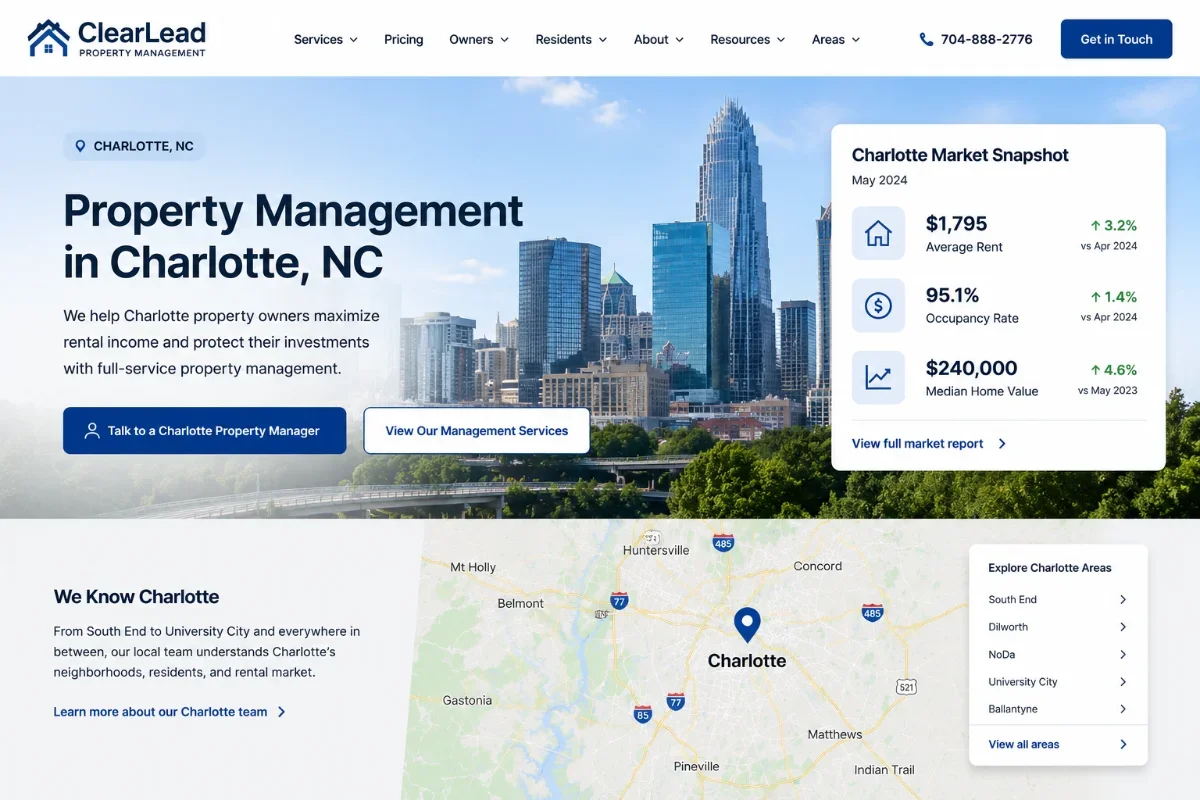
What it looks like done well: A unique URL like /property-management-charlotte/ with 1,200+ words of locally-specific content: rental market data, neighborhood notes, school districts, average rents, your local team, local testimonials, and a city-specific CTA. Not a duplicated template with the city name swapped in.
Most common mistake: A 'Service Areas' page that lists 40 cities as a bulleted list — and zero unique content per city. Google ignores it.
Feature 2. Schema Markup (LocalBusiness, FAQ, Review, BreadcrumbList)
Why it matters: Schema is structured data that tells Google what your page is. It enables rich results (stars, FAQs, breadcrumbs in SERPs) and is one of the cheapest ranking levers in the category. Most PM websites have none of it.
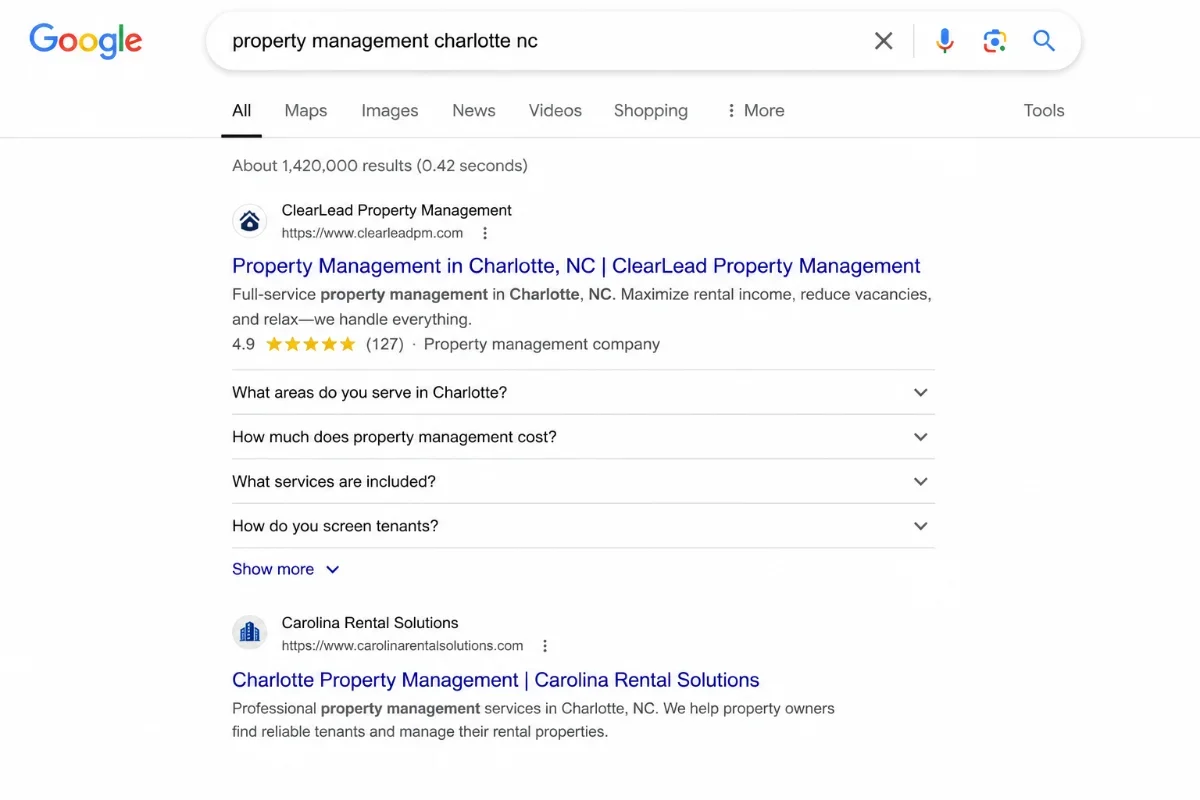
What it looks like done well: JSON-LD blocks for LocalBusiness on every city page, FAQ schema on every guide and service page, Review schema on testimonials, and BreadcrumbList on every internal page. Validated in Google's Rich Results Test.
Most common mistake: Schema dropped in once on the homepage and nowhere else, or schema that doesn't match the visible content (a Google manual-action risk).
Feature 3. Core Web Vitals — LCP Under 2.5 Seconds on Mobile
Why it matters: Page speed is a confirmed ranking factor and a documented conversion factor. Every second of load time past 2.5 seconds cuts mobile conversions by double digits. PM sites built on heavy templated platforms regularly load in 4–6 seconds.
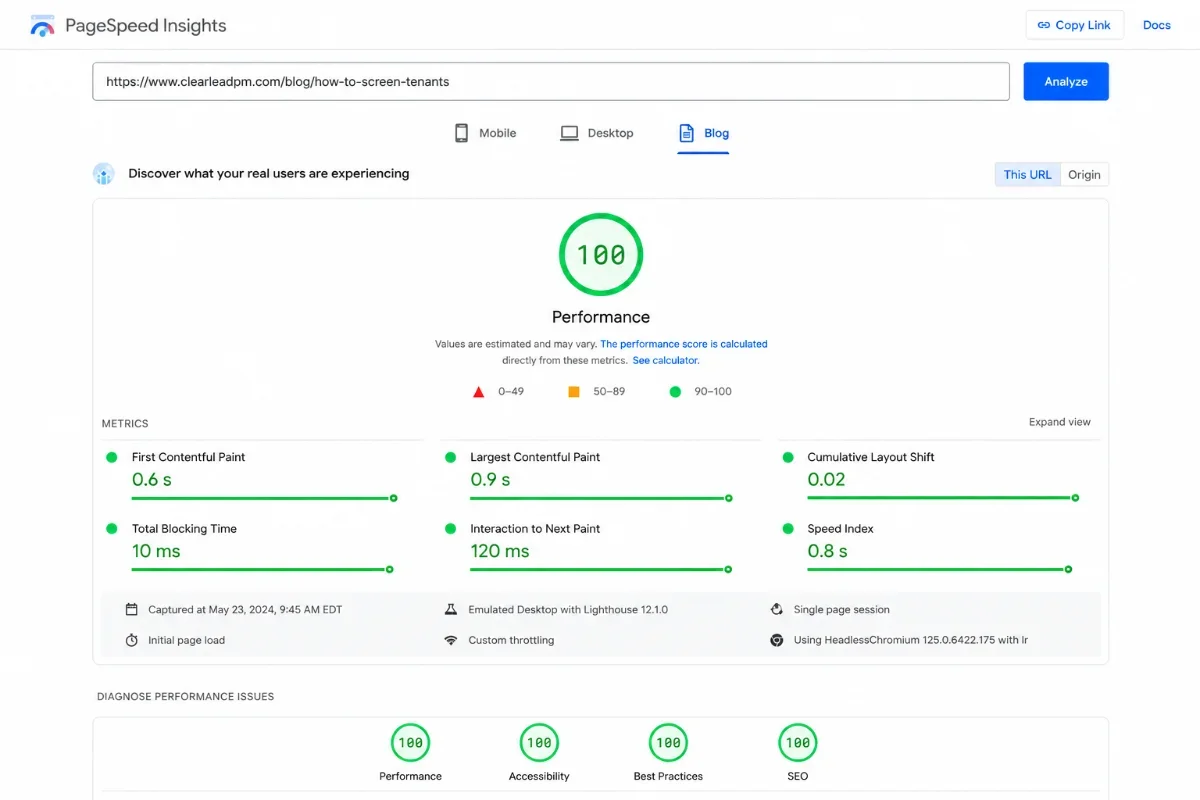
What it looks like done well: Largest Contentful Paint under 2.5s, Cumulative Layout Shift under 0.1, Interaction to Next Paint under 200ms — measured on a real mobile device in PageSpeed Insights, not on desktop with cache.
Most common mistake: Bloated hero video, uncompressed images, third-party chat widgets and tracking scripts firing before content paints.
Feature 4. Mobile-First, Not Mobile-Compatible
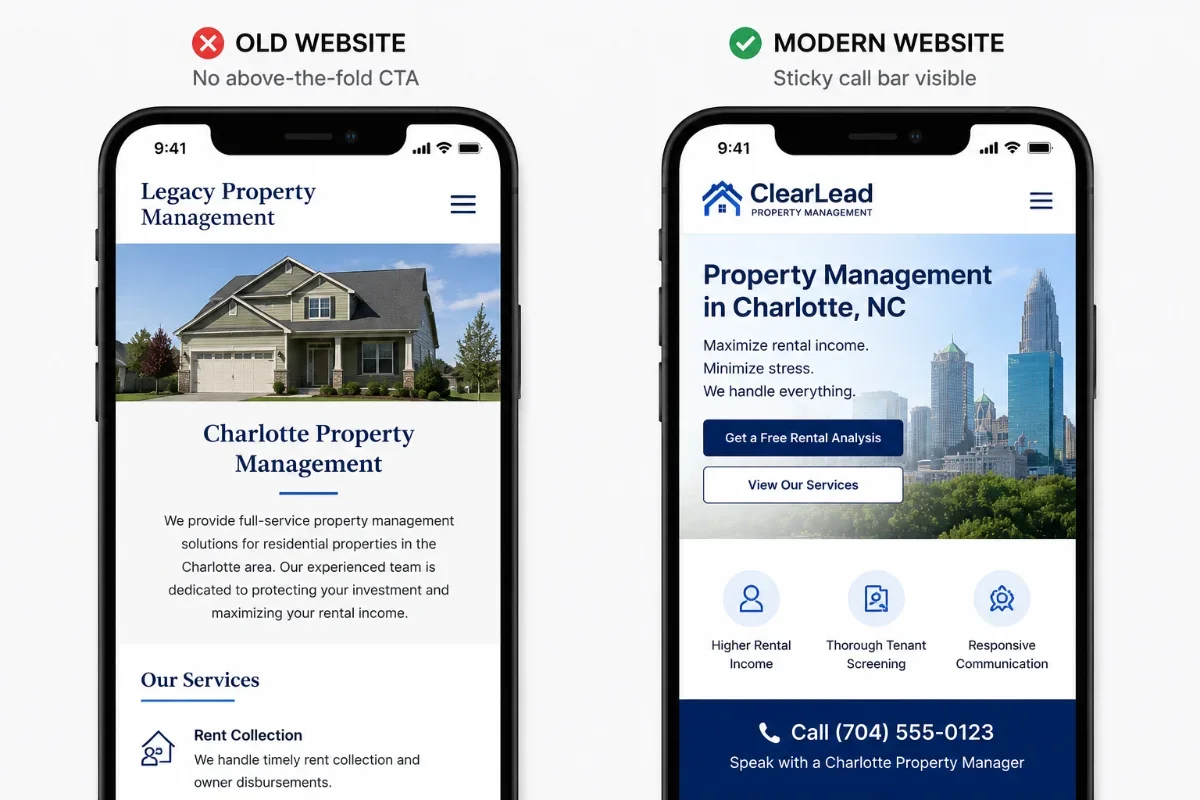
Why it matters: 70%+ of owner research and 80%+ of tenant browsing happens on mobile. 'Mobile responsive' is not the same as 'designed for mobile first.' On most PM sites, the CTA button is below the fold on a phone — sometimes three screens down.
What it looks like done well: Mobile design built before the desktop layout. Sticky 'Call' and 'Get a Quote' bars on mobile. Tap targets ≥48px. Forms that auto-fill phone keyboards. Maps that don't trap scroll.
Most common mistake: Desktop-first design squeezed into a phone. Hamburger menu hiding owner-specific CTAs. Form fields with cursor focus that zoom the page in iOS Safari.
Feature 5. Clean URL Structure and Hub-and-Spoke Internal Linking
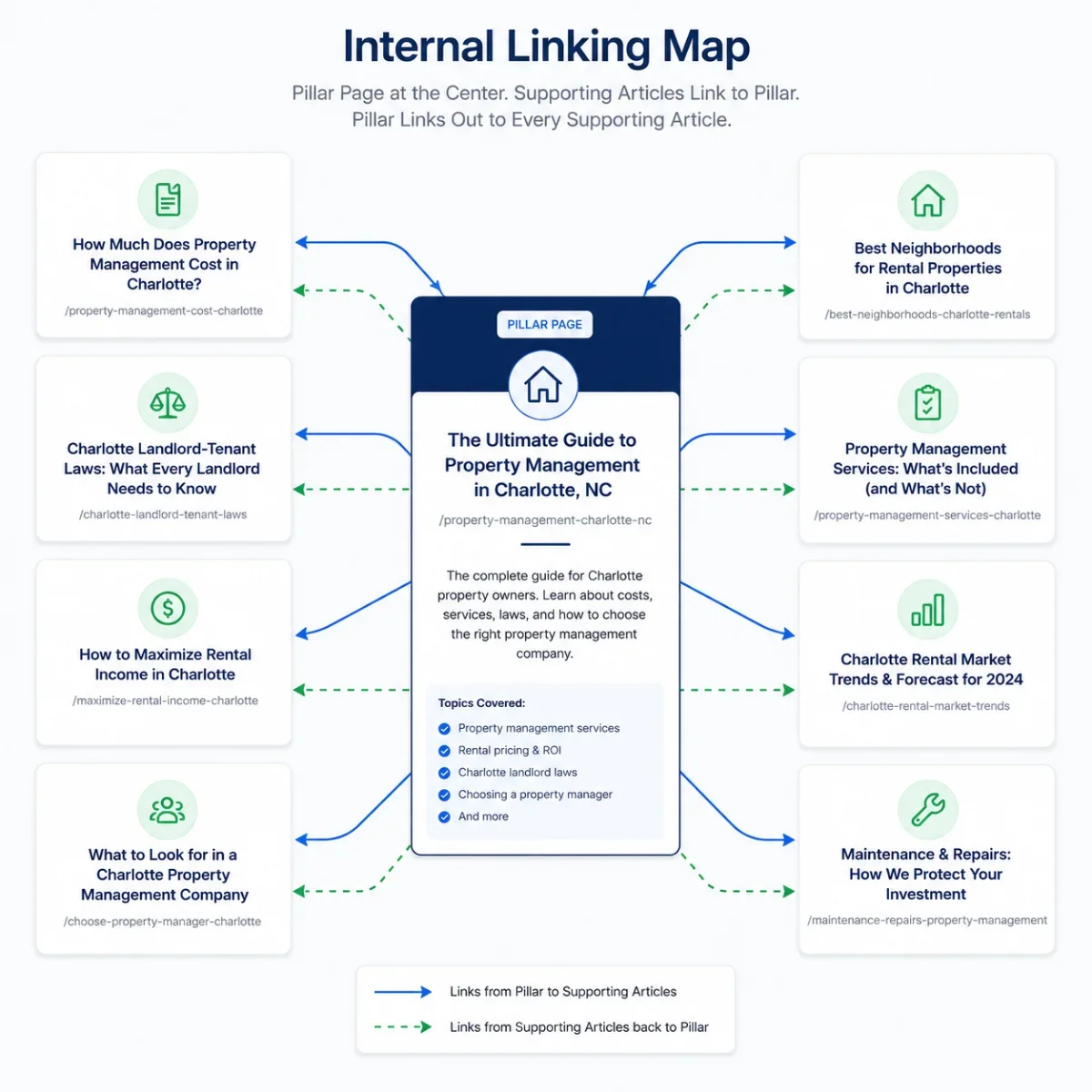
Why it matters: URLs and internal links tell Google how your site is organized and which pages matter most. Disorganized URLs (like /page.php?id=12) and weak internal linking are why so many PM sites rank for nothing beyond their brand name.
What it looks like done well: Short, keyword-rich URLs (/property-management-charlotte/). A clear hub-and-spoke structure where every blog post links up to its pillar page and laterally to two siblings. A 'related articles' module on every page.
Most common mistake: Random URLs, no internal links between blog posts, blog posts orphaned from any pillar page, and 'recent posts' as the only internal link module.
Feature 6. Google Business Profile Integration and Embedded Reviews
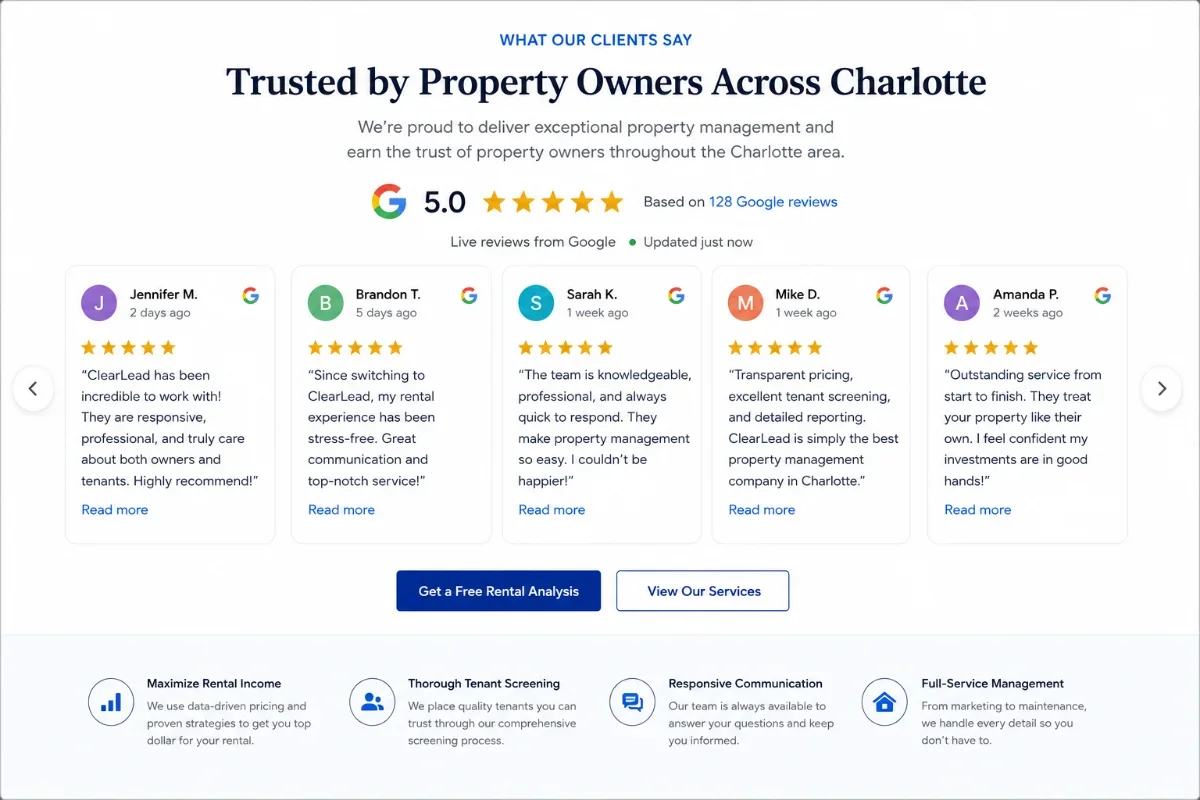
Why it matters: The Google Map Pack is the most valuable real estate for 'property management {city}' searches. Your website should pull in your live Google reviews and link tightly to your Google Business Profile to reinforce relevance.
What it looks like done well: Live review widget on the homepage showing real Google reviews (not stale screenshots). Direct GBP link in the footer. Review schema on review pages. Embedded Google Map in every city page footer.
Most common mistake: Stale testimonials from 2018, manual review screenshots that are not crawlable, and no link to the actual GBP listing.
Category 2 — Owner Conversion (Features 7–13)
Owners are the most valuable visitor on the site. They generate the most revenue, take the longest to convert, and are the easiest to alienate with a generic 'Services' page. The seven features below are designed around how an owner actually decides.
Feature 7. A Dedicated 'For Owners' Page (Not a Nav Tab Footnote)
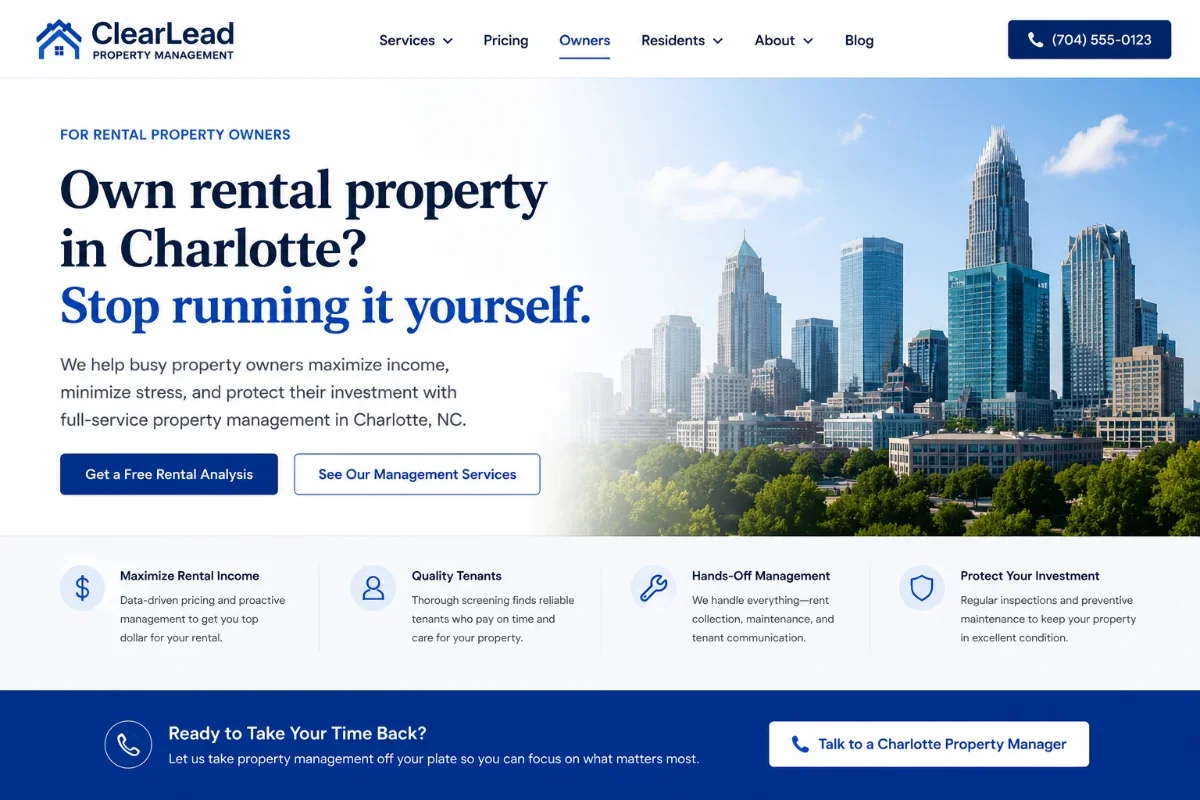
Why it matters: Owners are the buyer. They are the most valuable visitor on the entire site — and on most PM websites, the only 'owner' content is a tab in the nav that links to a generic services page written for tenants.
What it looks like done well: A full landing page at /property-owners/ written specifically for owners: pain points (vacancies, late rent, tenant headaches), outcomes (occupancy rate, on-time rent, fewer 2 a.m. calls), local case studies, transparent pricing posture, and an owner-specific lead magnet.
Most common mistake: A 'Services' page that conflates owners and tenants, with no owner-specific proof, no owner-specific lead magnet, and no owner-specific CTA.
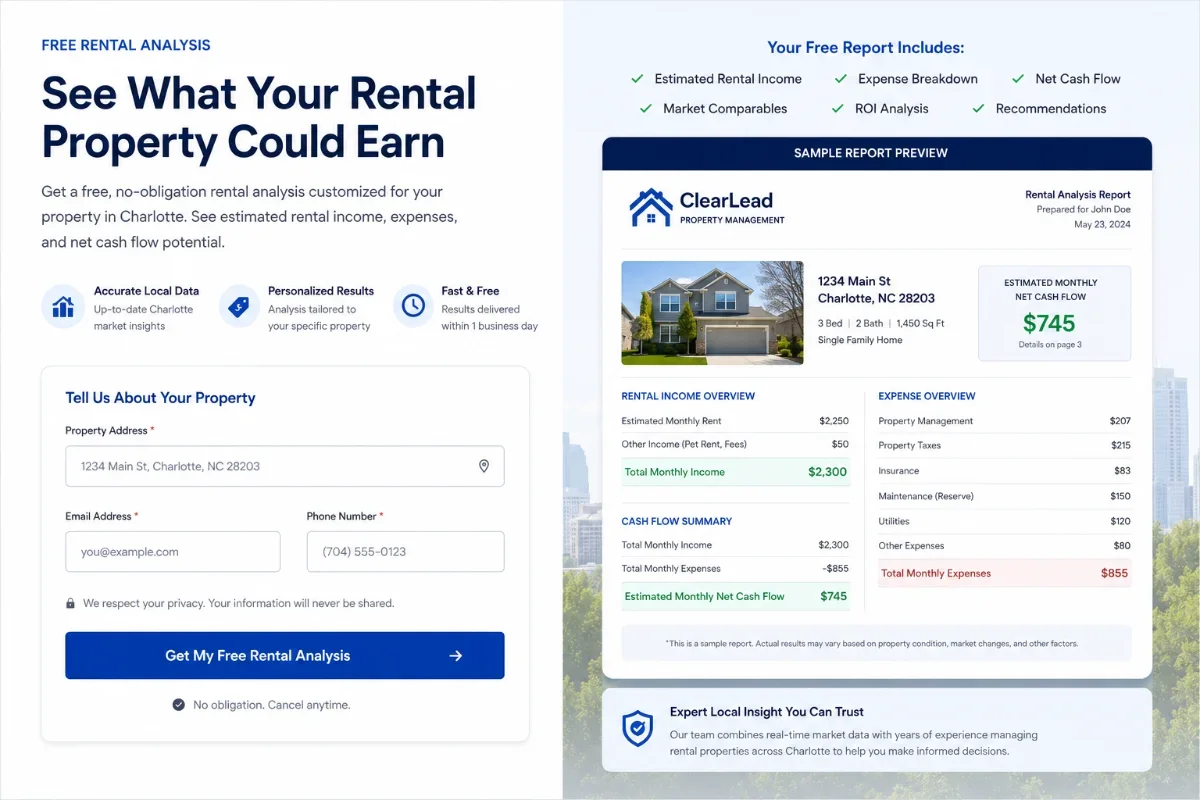
Feature 8. An Owner-Focused Lead Magnet (Rental Analysis or Owner Guide)
Why it matters: Owners are not ready to call on visit one. They need a low-commitment way to identify themselves. A free rental analysis or owner guide captures owner leads months before they are ready for a sales call.
What it looks like done well: A clearly-named offer like 'Free Rental Analysis' (with address input) or 'The First-Time Landlord Survival Guide' — gated behind a 3-field form, delivered immediately, followed by a 5-email nurture.
Most common mistake: A generic 'Download our brochure' offer that nobody wants. Or no lead magnet at all — only a 'Contact Us' form.
Feature 9. Transparent Pricing Posture (Even if Custom)
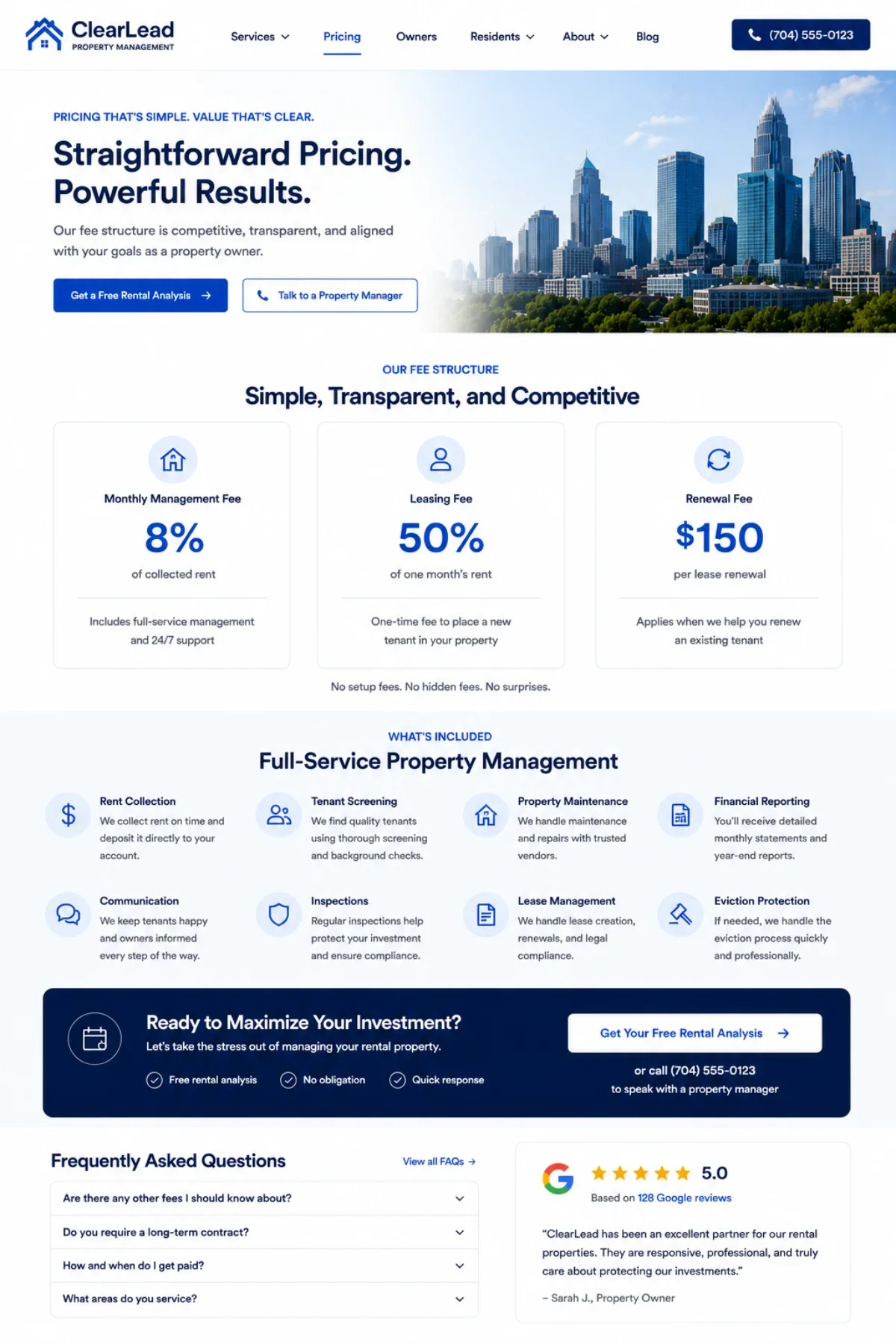
Why it matters: Owners price-compare. PM companies that hide all pricing lose research-stage owners to competitors who at least communicate a range. You don't have to publish a number — but you must communicate a posture.
What it looks like done well: A pricing page that explains the fee model (percentage of rent, leasing fee, renewal fee), the typical range ('8–10% for SFR; 5–7% for multifamily'), and what is included vs. extra. A clear 'Get a Custom Quote' CTA at the end.
Most common mistake: Pricing entirely behind a 'Call us for pricing' wall — which forces owners to either commit to a call or move on.
Feature 10. A Clear 'Why Us' Differentiator (Not 'Trusted, Established, Leading')
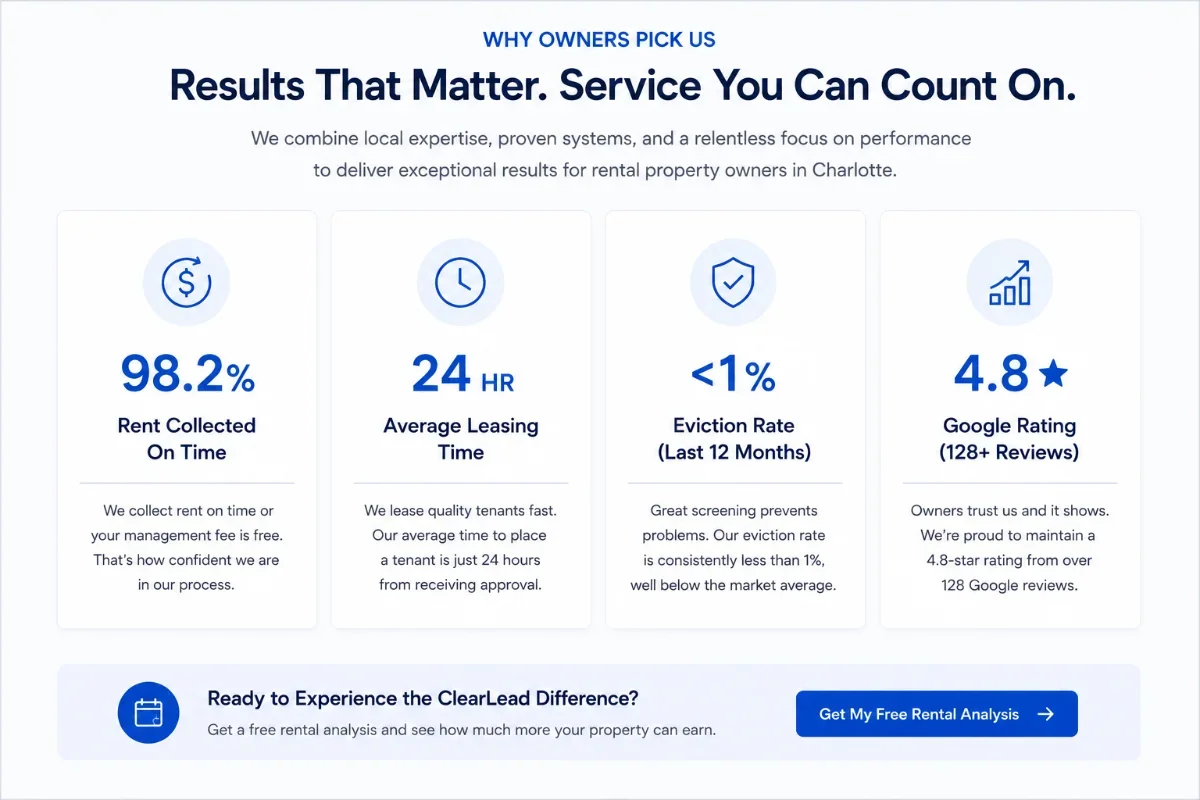
Why it matters: 'Trusted, leading, established' is what every competitor says. None of it differentiates. Owners pick the PM company that articulates a specific reason why — and most PM sites never name one.
What it looks like done well: A 3- or 5-point differentiator section with specifics: 'Average tenant placement in 19 days,' 'On-time rent collection at 98.2%,' '24/7 maintenance response under 4 hours,' 'NARPM Certified Residential Management Company.'
Most common mistake: Generic adjectives ('professional, experienced, reliable') with no proof. The 'About Us' page that talks about the company's history instead of the owner's outcomes.
Feature 11. Owner Case Studies With Outcomes (Not Just Quotes)
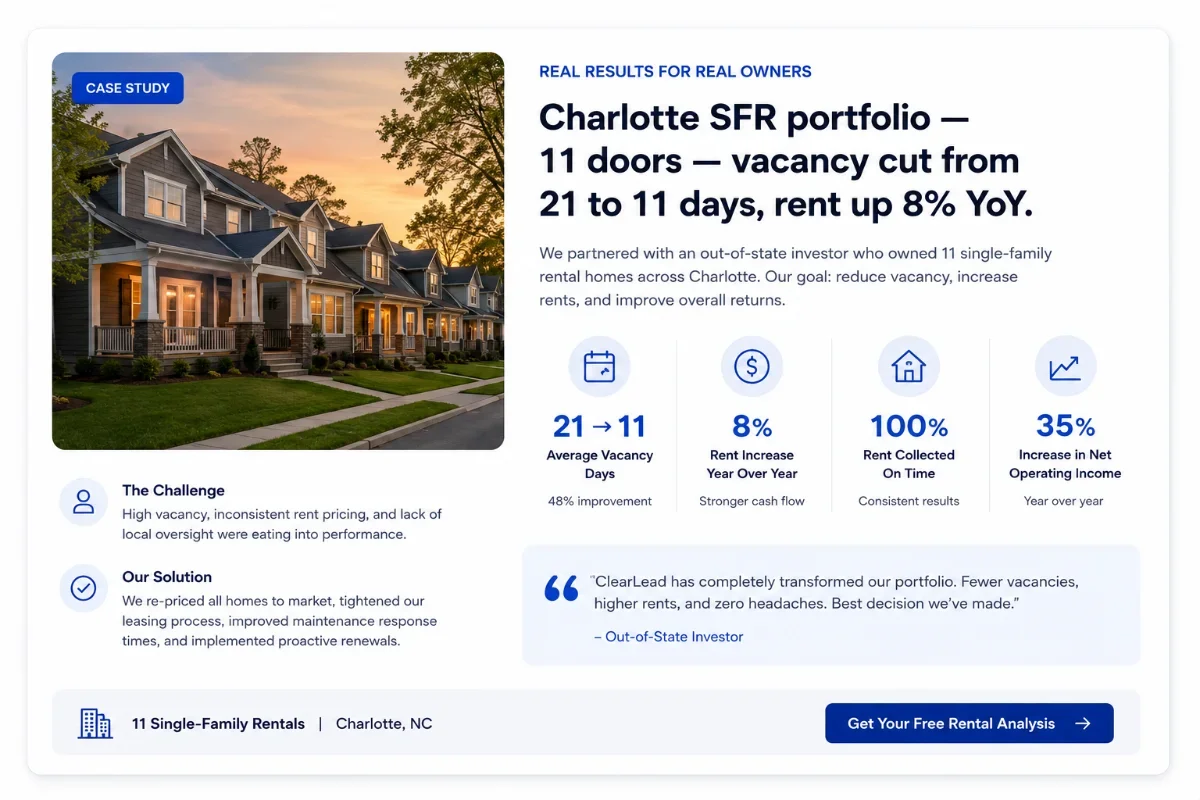
Why it matters: A two-sentence testimonial is the bare minimum. A real case study — with the property type, the problem, the outcome, and the numbers — is what closes owners who are comparing three PM companies.
What it looks like done well: 3–6 case studies of real owner clients (anonymized if needed) with: property type, prior PM situation, key actions taken, and outcomes ('vacancy down from 21 to 11 days,' 'rent up 8% year-over-year'). Photos, signatures, video clips.
Most common mistake: A 'Testimonials' page full of one-liners with no context, no numbers, and no photos.
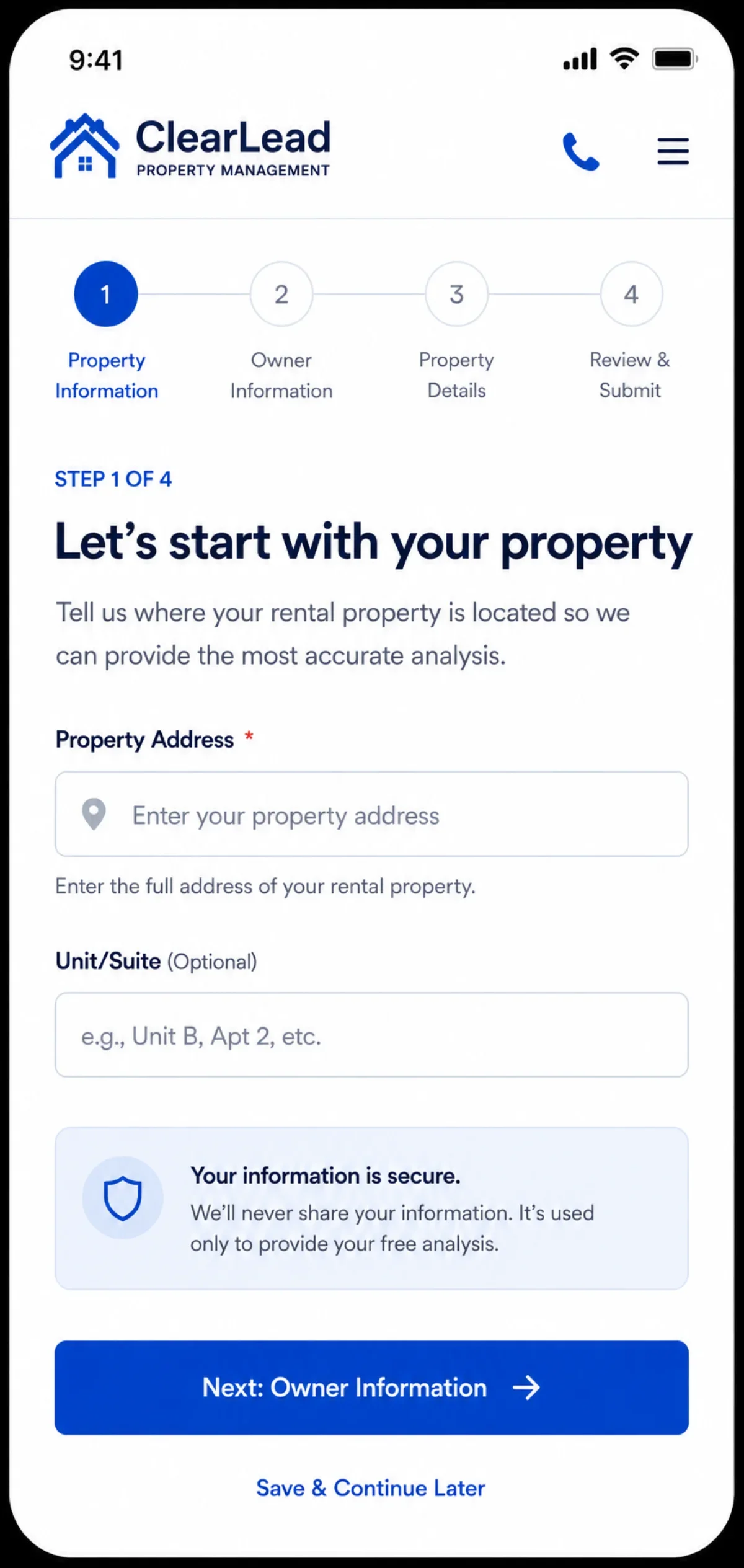
Feature 12. Multi-Step Owner Inquiry Form That Qualifies
Why it matters: A single 'Contact Us' form with name/email/message attracts everyone — including tenants, vendors, and tire-kickers. A multi-step form qualifies leads and improves conversion because each step asks for less than the last would feel like all at once.
What it looks like done well: Step 1: 'How many doors do you own?' Step 2: 'Where are they?' Step 3: 'What's your timeline?' Step 4: 'Name, email, phone.' Branches to a different thank-you experience for owners vs. tenants.
Most common mistake: One form for everyone. No qualification fields. No routing logic. Sales team manually triaging leads in their inbox.
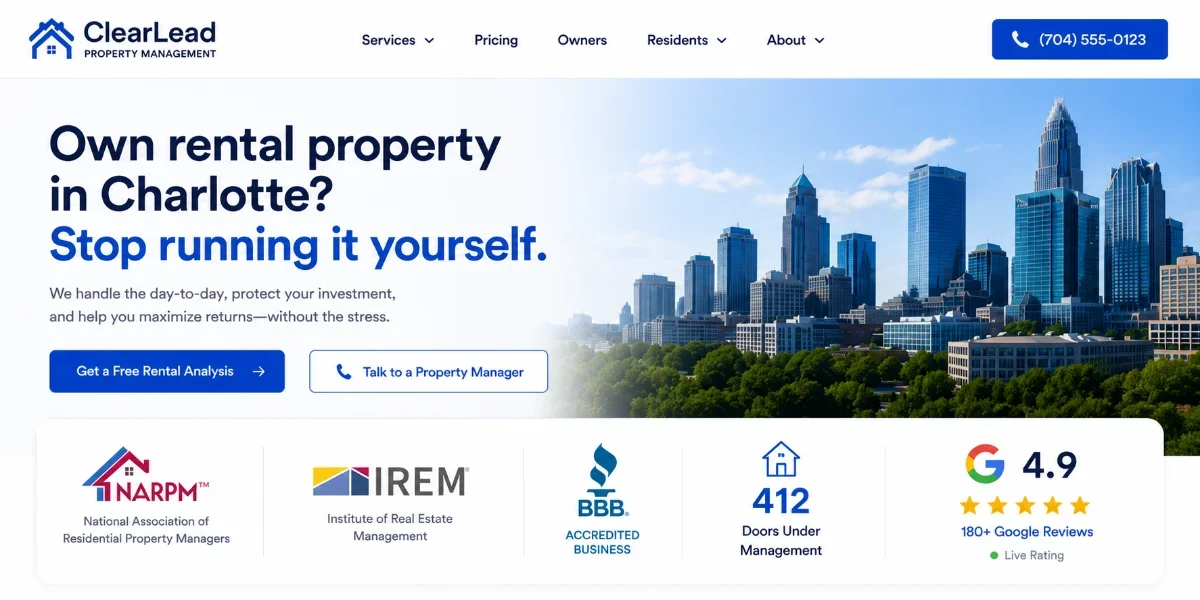
Feature 13. Trust Strip With Affiliations and Real Numbers
Why it matters: Owners are entrusting six- and seven-figure assets to a PM company. Trust must be established in the first 10 seconds. A trust strip with affiliations and live metrics does that better than any paragraph of copy.
What it looks like done well: A horizontal strip below the hero with NARPM, IREM, BBB A+, and a live count — 'managing 412 doors across Charlotte, Concord, and Gastonia' plus the live Google review average ('4.9 ★ from 217 reviews').
Most common mistake: A wall of generic affiliation logos with no context (and worse, with outdated or expired memberships).
Category 3 — Tenant Conversion (Features 14–18)
Tenants are not less important — they are different. They want self-service, speed, and clarity. These five features handle the volume side of the business so your team can focus on owners.
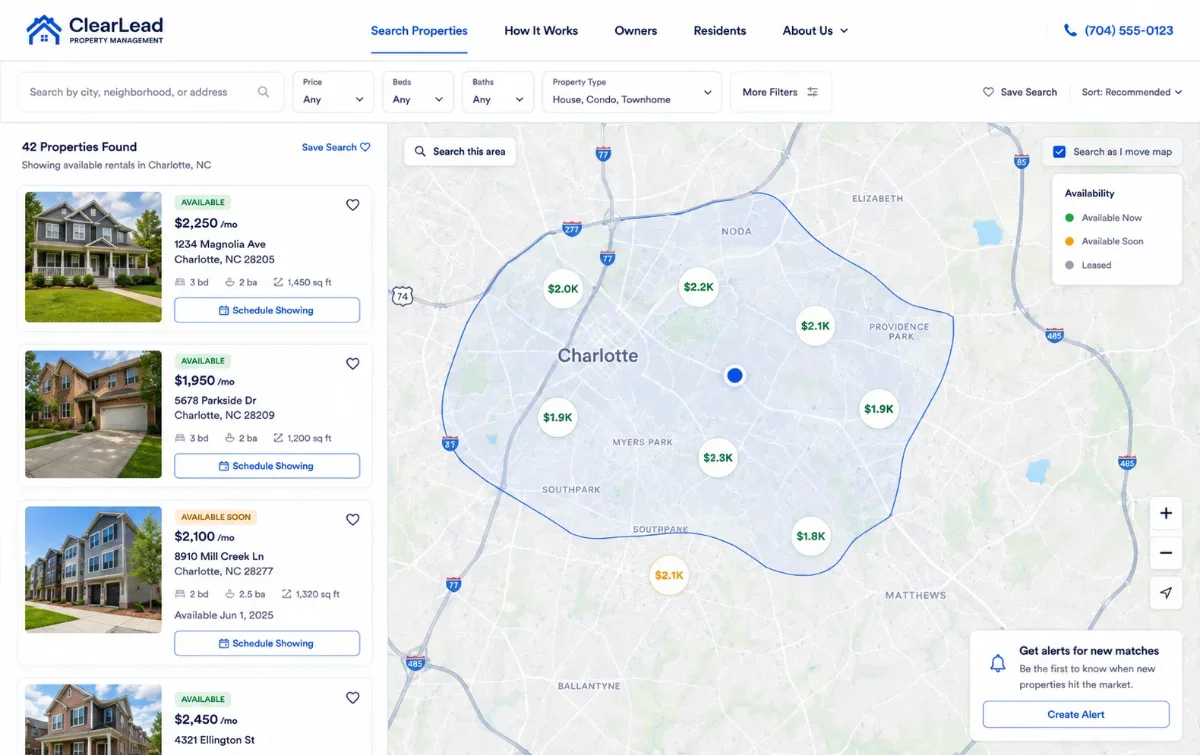
Feature 14. Property Search With Map View and Real-Time Availability
Why it matters: Tenants expect property search to look like Zillow or RentEngine. If your search is a 12-item card grid with stale availability, prospects bounce and call the next listing — which may belong to a competitor managing the same building.
What it looks like done well: Map-based property search with filters (beds, bath, pets, rent range, availability date), live syndication from your PM software (so 'Available' is always accurate), and a 'Schedule Showing' CTA on every listing.
Most common mistake: A static property list with old listings, no map view, no filters, and a 'For more information, call our office' note instead of an inline scheduler.
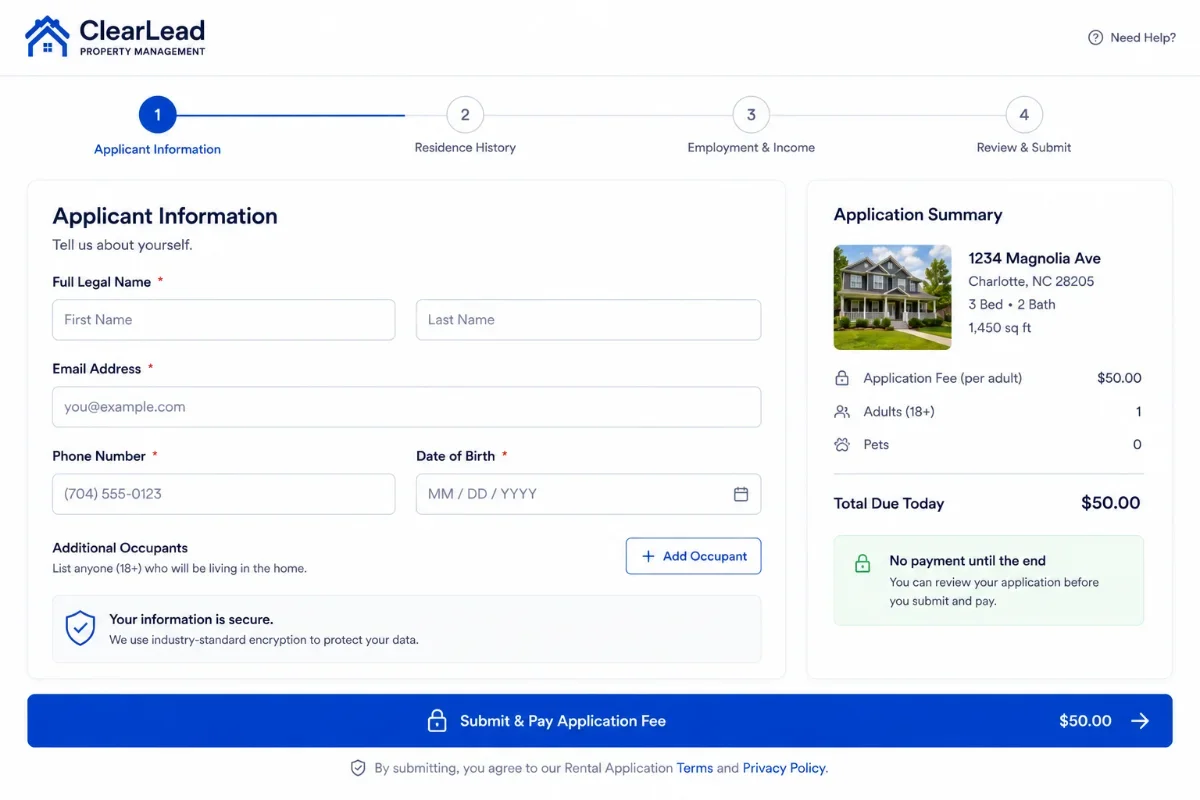
Feature 15. Self-Service Online Application With Screening
Why it matters: Tenants apply 24/7 — most of them late at night. If your application is a PDF download, half your applicants will not finish. Online applications double the application rate and let your team focus on screening, not paperwork.
What it looks like done well: An online application directly integrated with your screening provider (TransUnion SmartMove, RentPrep, etc.), payable application fee, and instant submission to your PM software.
Most common mistake: A PDF download with instructions to email it back. Or a third-party app that breaks the brand experience and loses the lead.
Feature 16. A Prominent Tenant Portal Login
Why it matters: Tenants visit your site to pay rent, submit maintenance requests, and access leases. If the portal login isn't immediately findable, your support team gets calls instead of self-service traffic — and your support cost goes up.
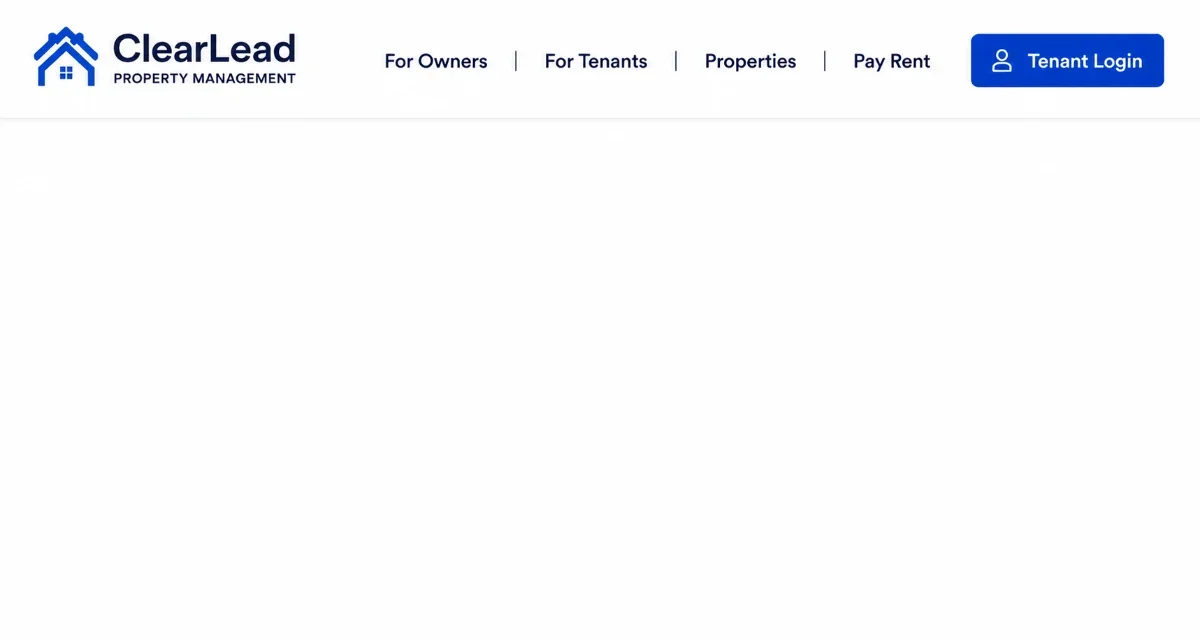
What it looks like done well: A clearly-labeled 'Tenant Login' button in the top-right of every page, plus a 'Pay Rent' shortcut in the footer and on the tenant landing page.
Most common mistake: A 'Resident Resources' dropdown that buries the login two clicks deep.
Feature 17. Integrated Maintenance Request System
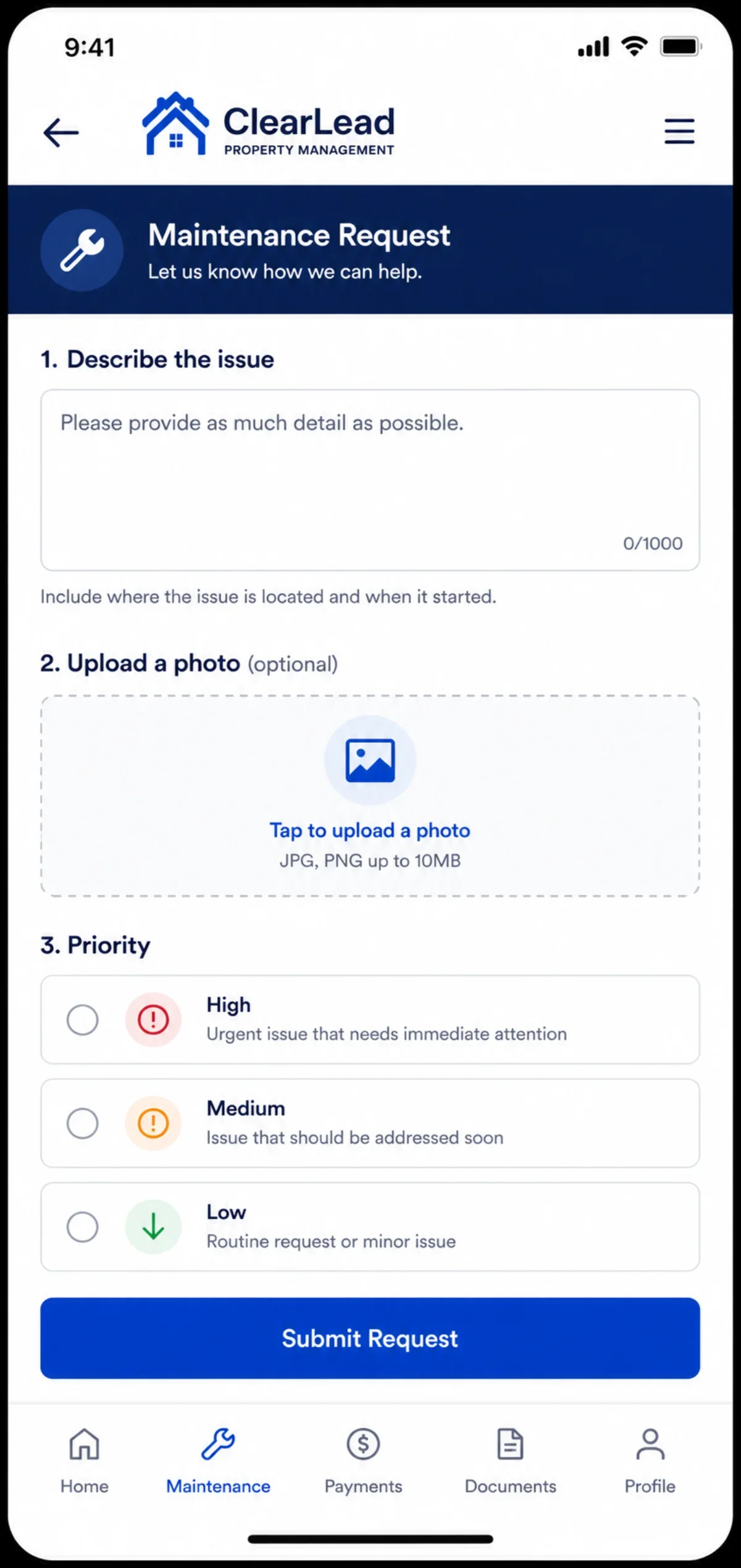
Why it matters: Maintenance requests are the #1 reason tenants visit the site. If the request form isn't fast, mobile-friendly, and connected to your PM software, you'll get the request as a voicemail at 6 a.m. instead.
What it looks like done well: A 1-step mobile-friendly maintenance form with image upload, priority selection, and direct routing into your PM software work-order queue.
Most common mistake: A maintenance email link or a form that goes to a generic inbox no one checks consistently.
Feature 18. Neighborhood and Community Pages
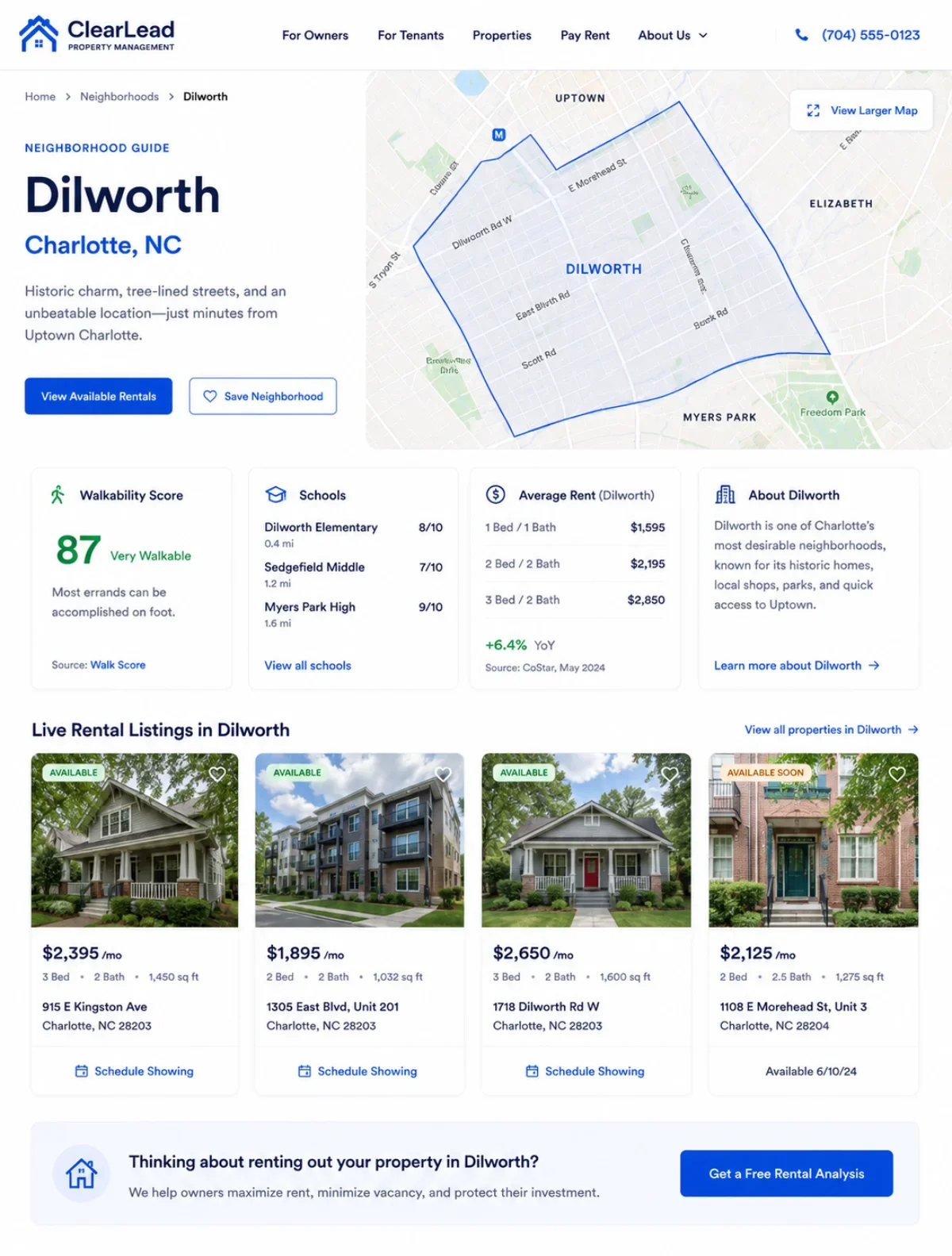
Why it matters: Tenants search for the neighborhood, not your company. 'Apartments in Dilworth,' 'Houses for rent in NoDa,' 'Pet-friendly rentals in South End' — those searches are gold, and they belong on your site, not your competitor's.
What it looks like done well: Dedicated pages for each neighborhood you serve: 1,000+ words on the area, photos, school info, walkability score, average rents, and live rental listings filtered to that neighborhood.
Most common mistake: A single 'Neighborhoods' overview page with two paragraphs and no individual neighborhood pages.
Category 4 — Operations Integration (Features 19–22)
Operations integration is what separates a marketing website from a marketing-plus-operations website. Without these four features, your team is doing double-entry and your data is stale.
Feature 19. Deep Integration With Your PM Software (AppFolio, Buildium, Rent Manager, PropertyWare)
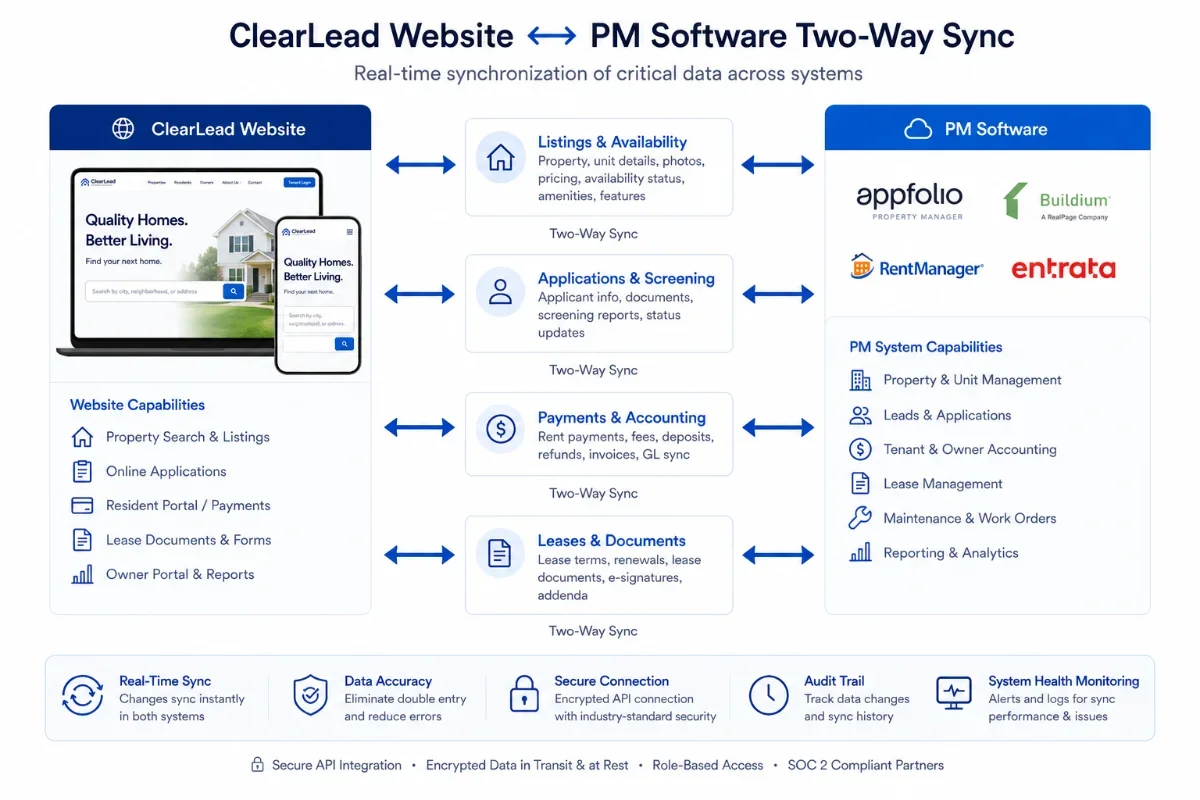
Why it matters: Your PM software is the source of truth for availability, applications, leases, and accounting. If your website is not syncing with it in real time, your team is doing double-entry — and your listings page is always wrong.
What it looks like done well: Live, two-way integration: vacancies on the website match the PM software within minutes; applications submitted on the website appear in the PM software automatically; tenant logins single-sign-on to the PM software portal.
Most common mistake: Manual listing updates, a separate tenant portal with separate login, and applications that arrive by email and have to be re-keyed.
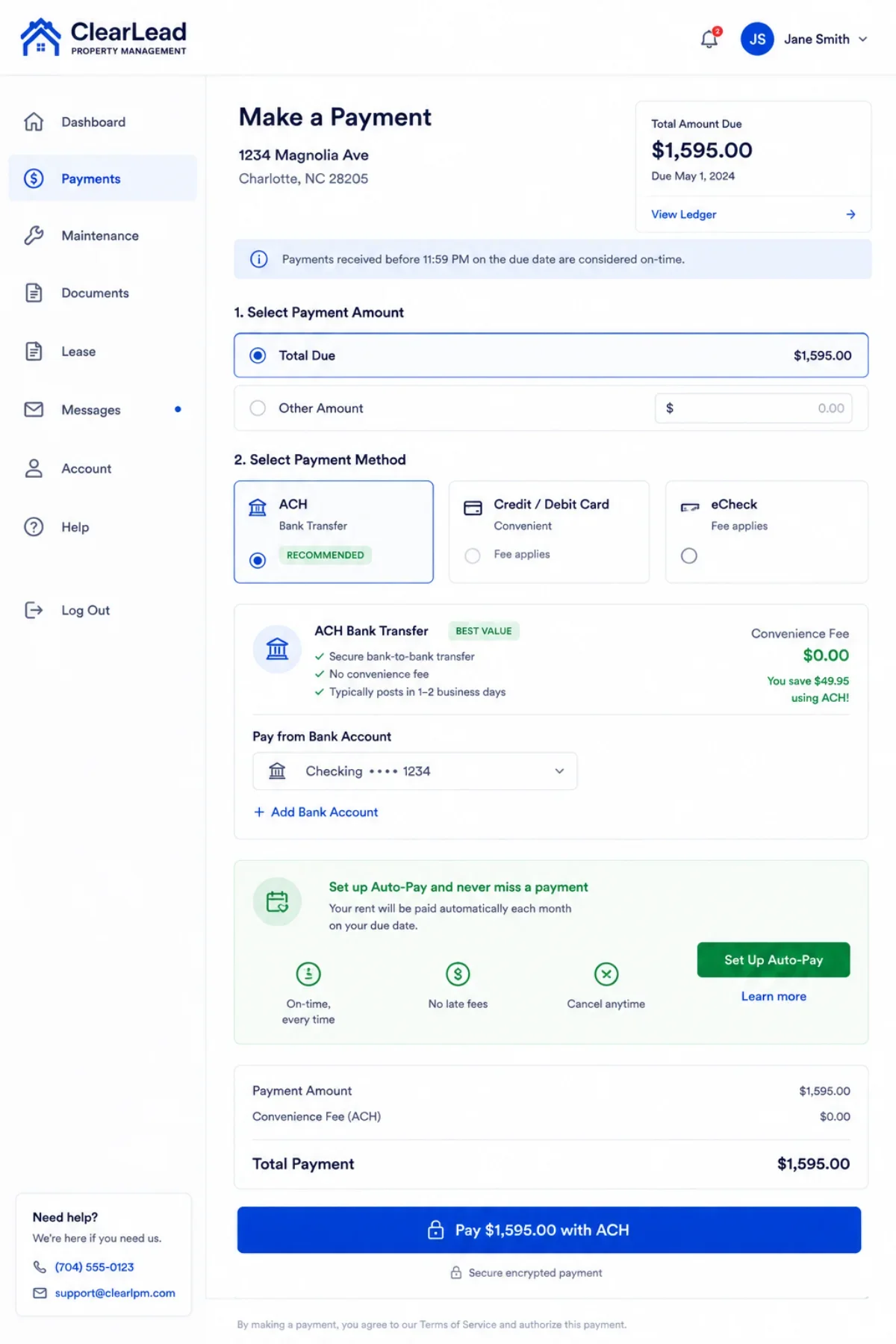
Feature 20. Online Rent Payment With ACH (Not Just a Portal Link)
Why it matters: Tenants who can pay rent online pay on time at meaningfully higher rates than tenants who mail a check. A frictionless 'Pay Rent' experience on the website itself reduces late payments and reduces calls to your office.
What it looks like done well: A 'Pay Rent' button on the homepage that opens an ACH-supported payment flow inside the tenant portal (no credit card surcharge friction for ACH). One click from the website.
Most common mistake: A 'Pay Rent' button that opens a confusing portal login screen with no explanation of payment methods.
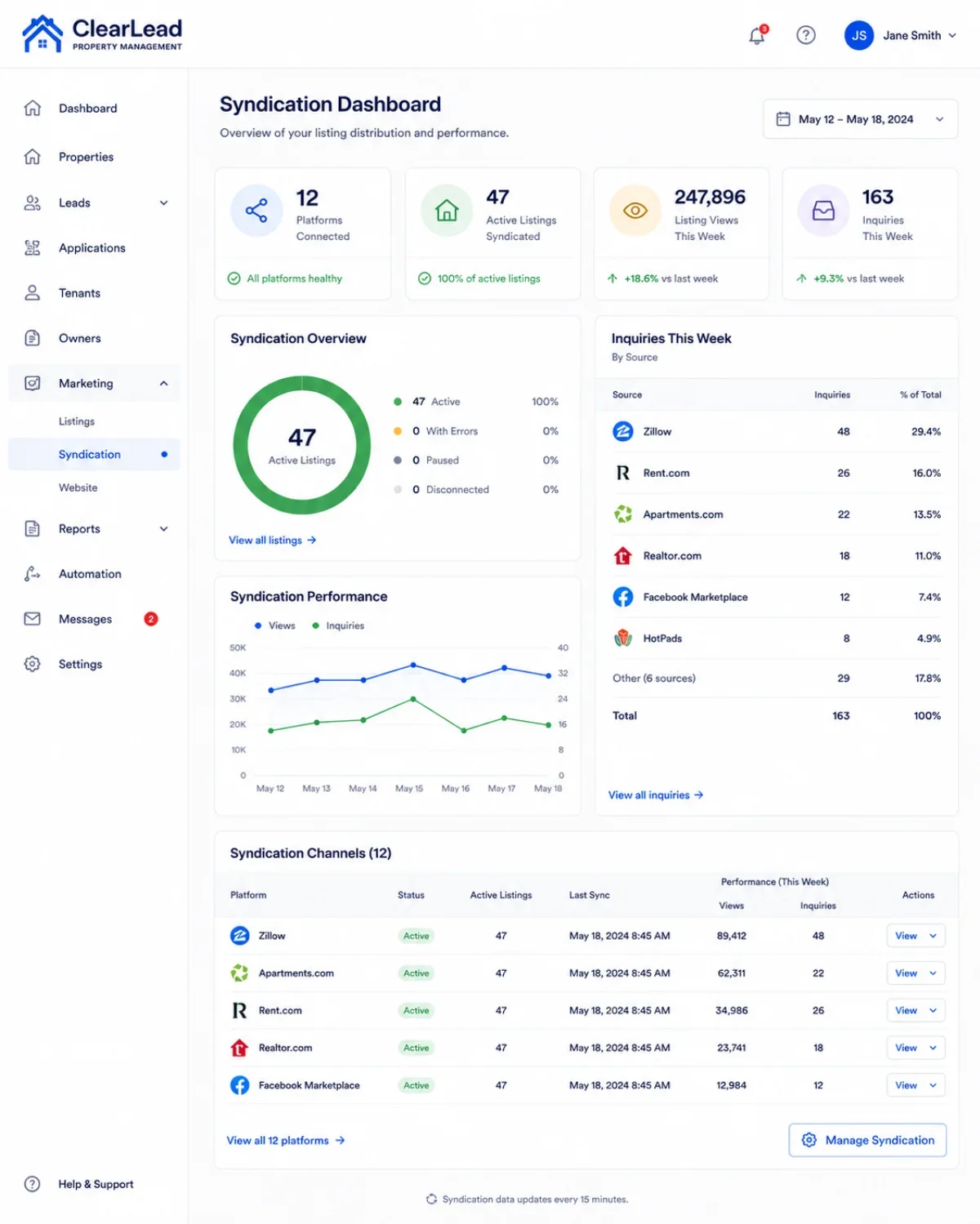
Feature 21. Automated Listing Syndication to Zillow, Trulia, Apartments.com
Why it matters: Tenants search where they search — usually not on your website first. Syndication multiplies your listing reach. Without it, your vacancies sit longer and your owners feel it.
What it looks like done well: PM software pushes every new listing to Zillow, Trulia, Apartments.com, Rent.com, Realtor.com, and Facebook Marketplace automatically. Inquiries route back into your CRM with source attribution.
Most common mistake: Manual posting (slow, inconsistent), or syndication without inquiry routing (so leads get lost).
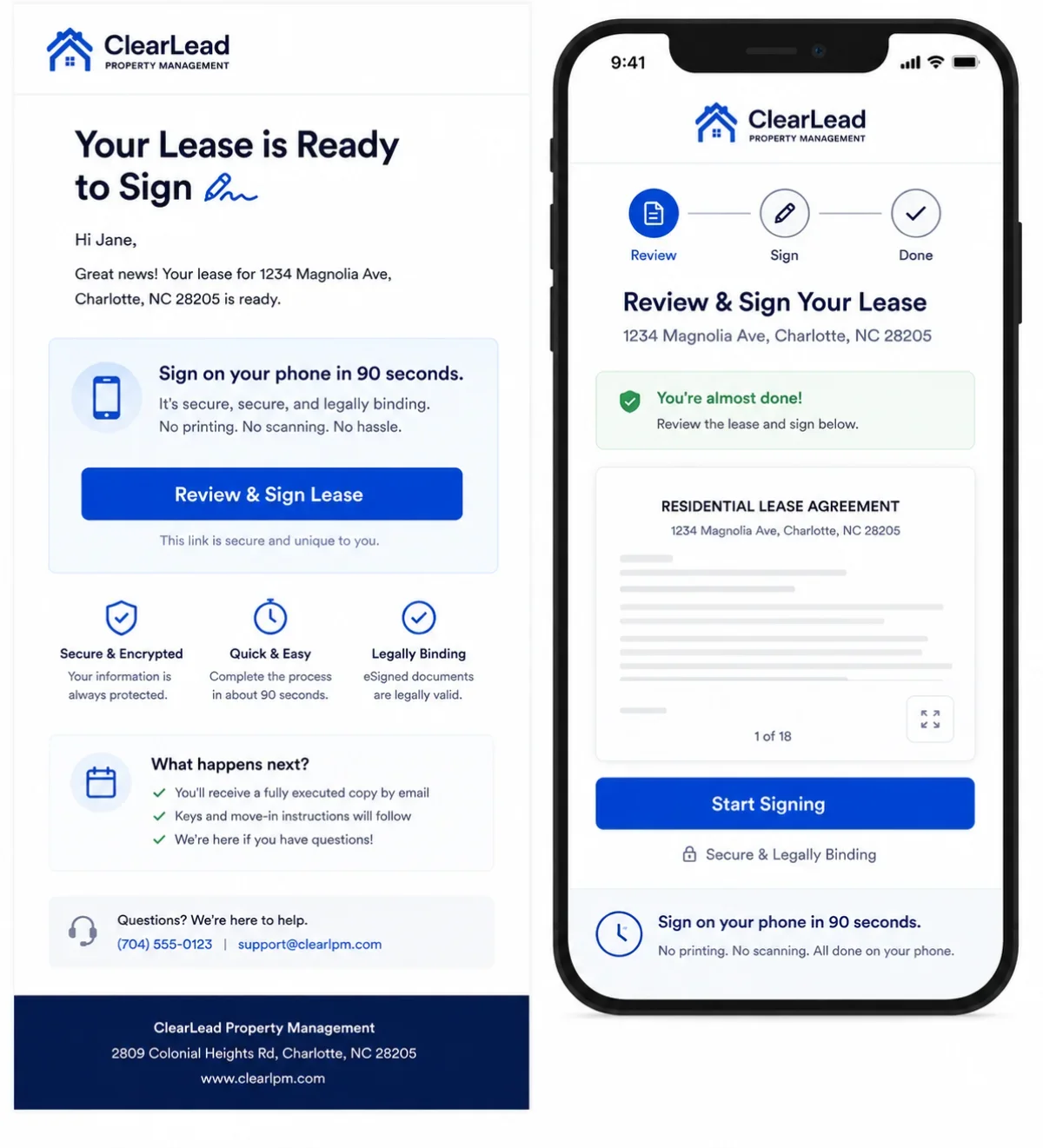
Feature 22. Document E-Sign for Leases, Applications, and Management Agreements
Why it matters: Paper slows everything down. E-sign cuts time-to-signed-lease from days to minutes and reduces the no-show rate on signed management agreements.
What it looks like done well: DocuSign / Dropbox Sign / built-in PM software e-sign on lease signing, application addenda, and new management agreements. Audit trail, automated reminders, and mobile-friendly signing.
Most common mistake: Printing leases for in-person signing, or emailing PDFs with a 'sign and scan back' instruction.
Category 5 — Growth Analytics (Features 23–27)
Without measurement, the previous 22 features are guesses. Growth analytics is what turns the website from a one-time project into a compounding asset.
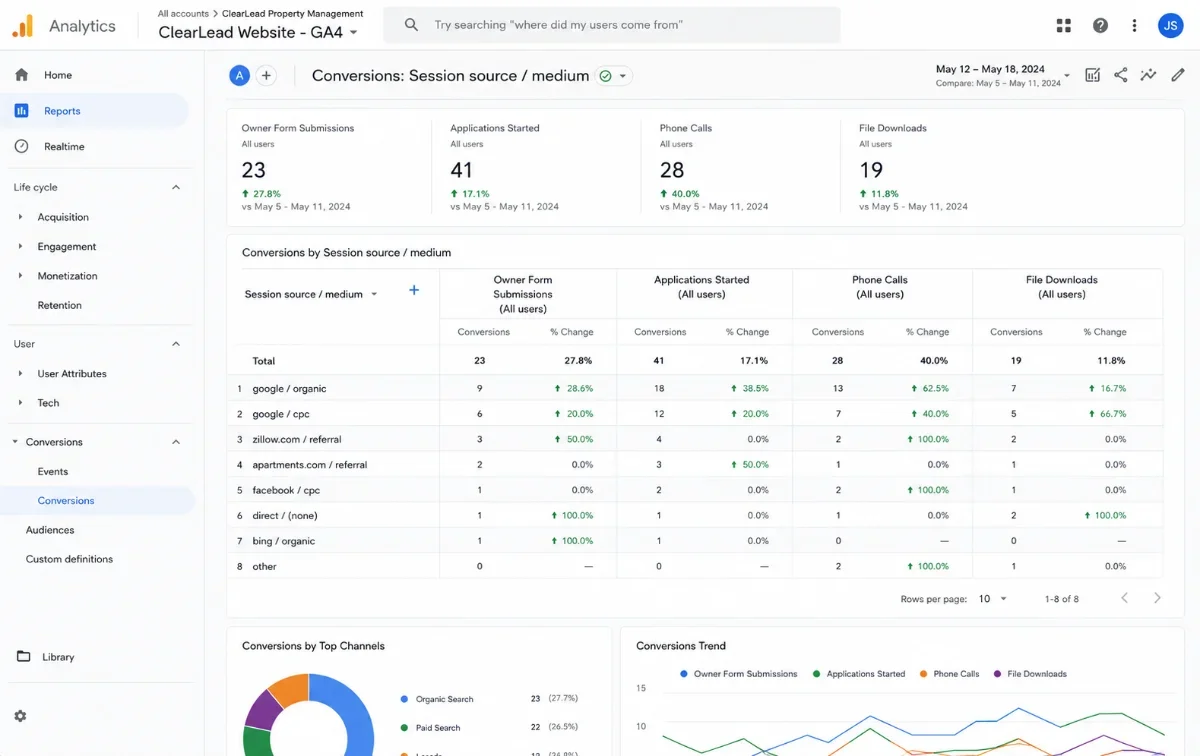
Feature 23. GA4 + Conversion Tracking on Every Meaningful Action
Why it matters: If you cannot measure which page, ad, or post produced an owner lead, you cannot improve anything. GA4 with proper conversion events is the floor — not a nice-to-have.
What it looks like done well: GA4 installed, with conversions defined for: owner form submission, tenant application, maintenance request, phone call, lead magnet download, and strategy call booking. Each event has source/medium/campaign attribution.
Most common mistake: GA4 firing only pageviews, with no conversion events — or no analytics at all. (Surprisingly common.)
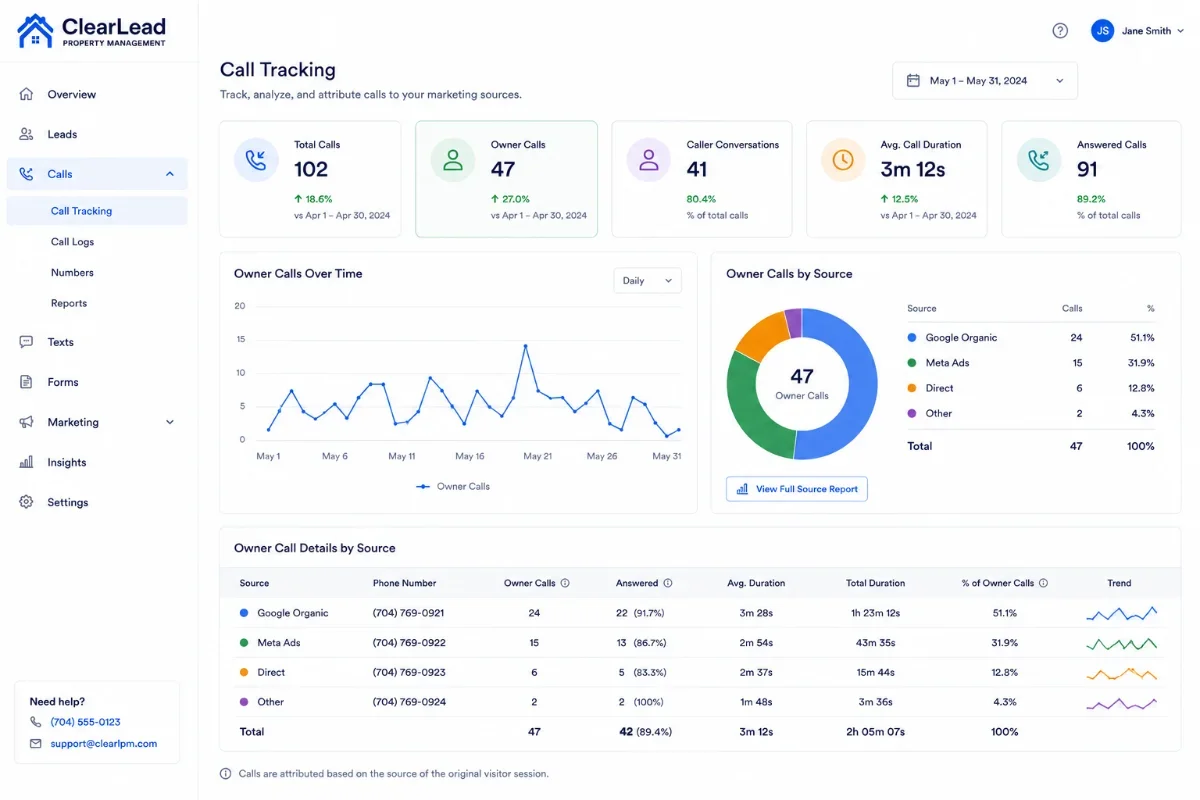
Feature 24. Call Tracking With Source Attribution
Why it matters: In property management, phone calls are still the #1 conversion event for owner leads. If you cannot tell which marketing channel produced the call, you cannot allocate budget intelligently.
What it looks like done well: Dynamic number insertion (CallRail or equivalent) that swaps the displayed phone number based on the visitor's source. Calls recorded, transcribed, tagged ('owner inquiry' vs 'maintenance' vs 'tenant'), and attributed in GA4.
Most common mistake: One static phone number everywhere, with no way to tell which channel generated which call.
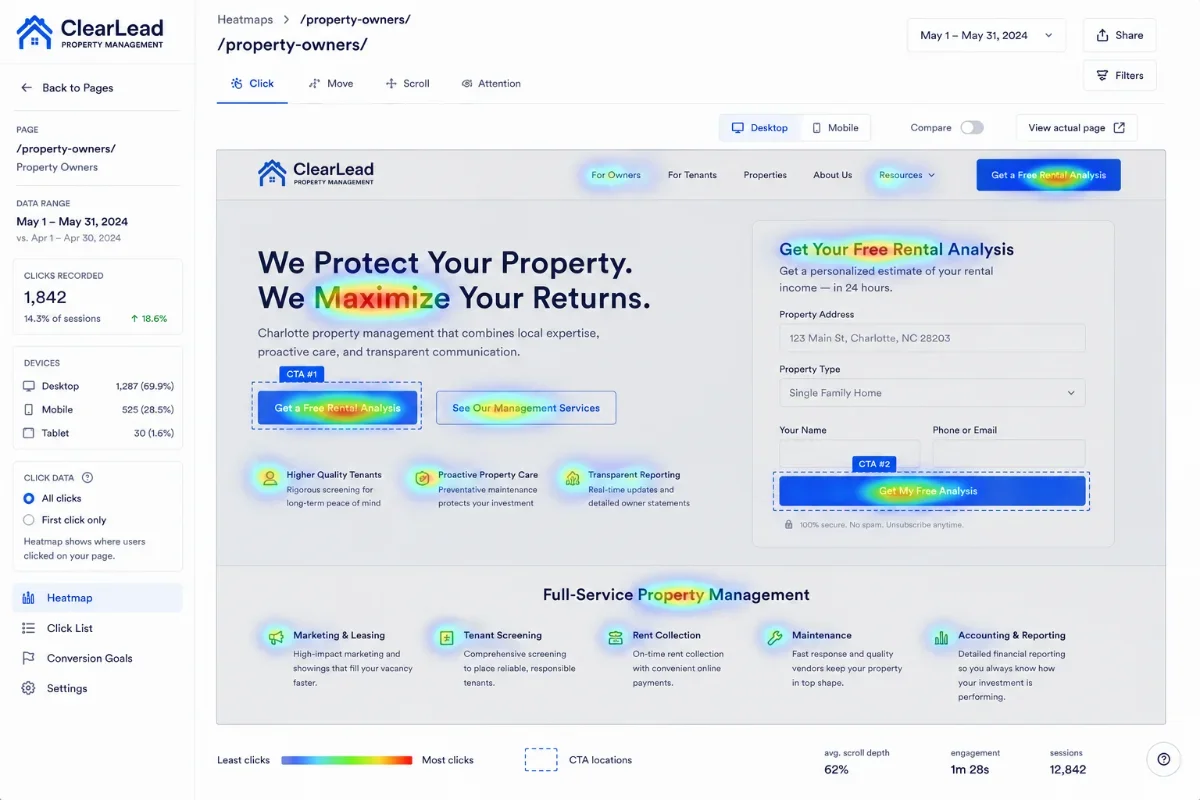
Feature 25. Heatmaps and Session Recording (Hotjar or Microsoft Clarity)
Why it matters: Analytics tell you what visitors did. Heatmaps and recordings tell you why they didn't. A 5-minute review of session recordings will surface form abandonment, dead-zone clicks, and 'rage scrolling' that no analytics tool will flag for you.
What it looks like done well: Heatmaps on every key landing page (home, owners, contact, application). Session recordings sampled on conversion and abandonment events. Friction logs reviewed monthly.
Most common mistake: Pure quantitative analytics with no qualitative layer — so you guess at every CRO change.
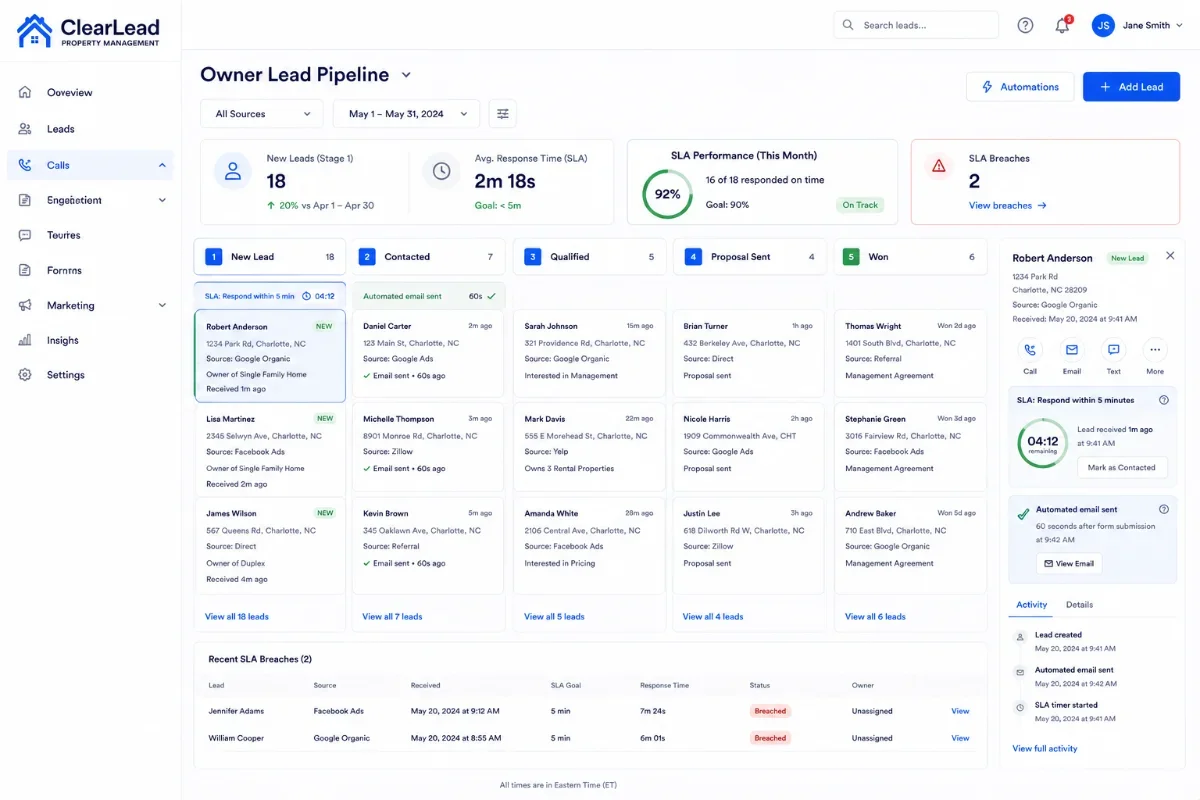
Feature 26. CRM Integration and Automated Lead Routing
Why it matters: A form submission that lands in someone's inbox dies there. Leads need to enter a CRM, get routed to a specific person, and trigger an automated follow-up — within seconds, not hours.
What it looks like done well: Website forms post directly to a CRM (HubSpot, Pipedrive, GoHighLevel, or PM-software CRM). Owner leads route to the BDR/owner; tenant leads route to the leasing inbox. SLA timers and automated first-touch emails.
Most common mistake: Forms go to a shared inbox. No CRM. No routing rules. No SLA. The first follow-up happens 3 days later — by which point the owner has already signed with a competitor.
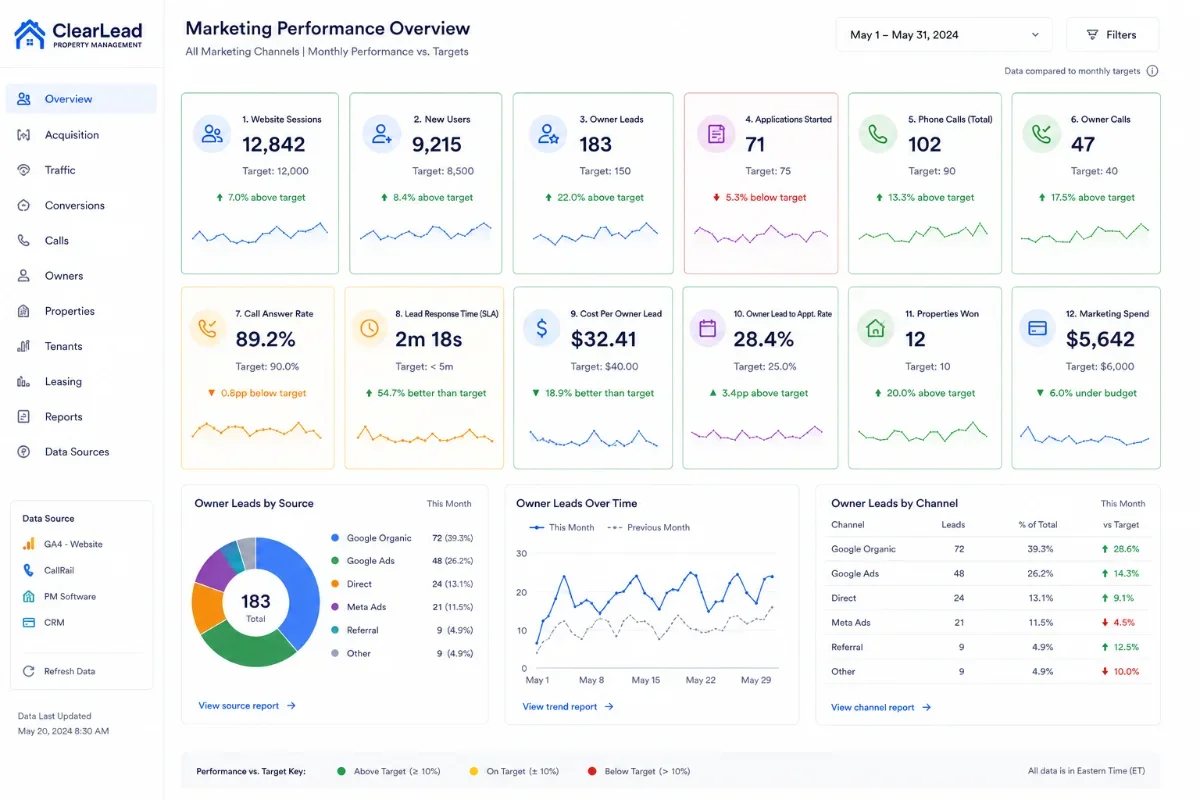
Feature 27. A Monthly Marketing Dashboard the Operator Actually Reads
Why it matters: Most PM owners have no idea what their website is producing. A monthly 1-page dashboard makes performance visible — and makes the conversation about marketing budget rational instead of emotional.
What it looks like done well: A Looker Studio (or equivalent) dashboard with 8–12 numbers: visits, owner leads, tenant applications, calls, conversion rate, top organic keywords, top landing pages, top ad sets, cost per lead, cost per contract. One page, refreshed monthly.
Most common mistake: A 14-tab Google Analytics export with no narrative, no targets, and no recommendations. Or no reporting at all.
The Scorecard — Rate Your Property Management Website Out of 27
Print this section or copy it into a document. For each feature, score yourself: 1 point for Yes, 0.5 for Partial, 0 for No. Add the points. The interpretation is below the table.
27-Point Property Management Website Checklist
Use this checklist to evaluate whether your property management website is built to rank, convert owners, serve tenants, connect operations, and measure real growth.
| # | Feature | Category | Yes / Partial / No |
|---|---|---|---|
| 1 | City-Level Landing Pages With Local Intent | SEO Foundation | ☐ Yes☐ Partial☐ No |
| 2 | Schema Markup — LocalBusiness, FAQ, Review, BreadcrumbList | SEO Foundation | ☐ Yes☐ Partial☐ No |
| 3 | Core Web Vitals — LCP Under 2.5 Seconds on Mobile | SEO Foundation | ☐ Yes☐ Partial☐ No |
| 4 | Mobile-First, Not Mobile-Compatible | SEO Foundation | ☐ Yes☐ Partial☐ No |
| 5 | Clean URL Structure and Hub-and-Spoke Internal Linking | SEO Foundation | ☐ Yes☐ Partial☐ No |
| 6 | Google Business Profile Integration and Embedded Reviews | SEO Foundation | ☐ Yes☐ Partial☐ No |
| 7 | A Dedicated “For Owners” Page — Not a Nav Tab Footnote | Owner Conversion | ☐ Yes☐ Partial☐ No |
| 8 | An Owner-Focused Lead Magnet — Rental Analysis or Owner Guide | Owner Conversion | ☐ Yes☐ Partial☐ No |
| 9 | Transparent Pricing Posture — Even if Custom | Owner Conversion | ☐ Yes☐ Partial☐ No |
| 10 | A Clear “Why Us” Differentiator — Not “Trusted, Established, Leading” | Owner Conversion | ☐ Yes☐ Partial☐ No |
| 11 | Owner Case Studies With Outcomes — Not Just Quotes | Owner Conversion | ☐ Yes☐ Partial☐ No |
| 12 | Multi-Step Owner Inquiry Form That Qualifies | Owner Conversion | ☐ Yes☐ Partial☐ No |
| 13 | Trust Strip With Affiliations and Real Numbers | Owner Conversion | ☐ Yes☐ Partial☐ No |
| 14 | Property Search With Map View and Real-Time Availability | Tenant Conversion | ☐ Yes☐ Partial☐ No |
| 15 | Self-Service Online Application With Screening | Tenant Conversion | ☐ Yes☐ Partial☐ No |
| 16 | A Prominent Tenant Portal Login | Tenant Conversion | ☐ Yes☐ Partial☐ No |
| 17 | Integrated Maintenance Request System | Tenant Conversion | ☐ Yes☐ Partial☐ No |
| 18 | Neighborhood and Community Pages | Tenant Conversion | ☐ Yes☐ Partial☐ No |
| 19 | Deep Integration With Your PM Software — AppFolio, Buildium, Rent Manager, PropertyWare | Operations Integration | ☐ Yes☐ Partial☐ No |
| 20 | Online Rent Payment With ACH — Not Just a Portal Link | Operations Integration | ☐ Yes☐ Partial☐ No |
| 21 | Automated Listing Syndication to Zillow, Trulia, Apartments.com | Operations Integration | ☐ Yes☐ Partial☐ No |
| 22 | Document E-Sign for Leases, Applications, and Management Agreements | Operations Integration | ☐ Yes☐ Partial☐ No |
| 23 | GA4 + Conversion Tracking on Every Meaningful Action | Growth Analytics | ☐ Yes☐ Partial☐ No |
| 24 | Call Tracking With Source Attribution | Growth Analytics | ☐ Yes☐ Partial☐ No |
| 25 | Heatmaps and Session Recording — Hotjar or Microsoft Clarity | Growth Analytics | ☐ Yes☐ Partial☐ No |
| 26 | CRM Integration and Automated Lead Routing | Growth Analytics | ☐ Yes☐ Partial☐ No |
| 27 | A Monthly Marketing Dashboard the Operator Actually Reads | Growth Analytics | ☐ Yes☐ Partial☐ No |
How to Read Your Score
Use your total score to understand whether your website is a growth asset, a conversion problem, or a rebuild candidate.
| Score | What It Means | What To Do First |
|---|---|---|
| 24–27 | Top decile. Your website is genuinely a growth asset. | Compound: invest in content velocity, more city pages, and Meta Ads layered on top of an already-strong site. |
| 18–23 | Above average. The bones are good; the conversion mechanics are leaky. | Fix Category 2 — owner conversion — first, the highest-leverage upgrade. Then Category 5 — analytics. |
| 12–17 | Average. Looks acceptable, performs poorly. | Audit the SEO foundation — Category 1 — and the owner conversion path — Category 2. These are the cheapest fixes with the biggest payoff. |
| 6–11 | Below average. The site is costing you contracts, not winning them. | A targeted redesign focused on the 27 features is almost always a higher-ROI investment than another year of SEO spend on a broken foundation. |
| 0–5 | Critical. You are paying a vendor for something the market has moved past. | Do not iterate. Rebuild. Start with an audit so you know exactly what to keep, what to migrate, and what to redirect. |
Get the Free 27-Point Scorecard PDF
We turned this list into a printable, fillable scorecard PDF — with a built-in scoring rubric, a 'top 3 to fix first' worksheet, and an anonymized sample audit so you can see what a real evaluation looks like.
Common Mistakes That Disqualify a Website From the Top of the List
Across hundreds of property management websites, a small set of recurring mistakes accounts for most of the underperformance. If your site has any of these, you are losing points on multiple features at once — not just one.
Mistake 1 — Treating the Website as a Design Project, Not a Growth System
The single most common cause of underperformance. The website was scoped as 'redesign,' the deliverable was 'a new look,' and SEO, conversion, and operations integration were never named in the brief. The result is a beautiful site that scores 4/27.
Mistake 2 — Buying a Template-Based, Locked-In Platform
Template platforms are fast to launch and slow to grow. Most of the 27 features above are difficult or impossible to add later because the underlying CMS does not support them. The 'cheapest' website becomes the most expensive one over a 3-year horizon — especially when you cannot migrate without rebuilding from scratch.
Mistake 3 — Conflating Owner and Tenant Audiences on Every Page
Owners and tenants want different things. A homepage that tries to speak to both ends up speaking to neither. Modern PM websites segment the experience from the navigation down to the form.
Mistake 4 — Skipping Local SEO and Treating the Site as National
Property management is hyper-local. If your site is structured as a single national brand page with a 'service areas' bullet list, you have abandoned the most valuable search traffic in your category.
Mistake 5 — Buying SEO as an Add-On Retainer
SEO is a structural property of the website itself — not a service you bolt on. If the underlying site has bad URL structure, no schema, slow speed, and no internal linking architecture, no retainer in the world will rank it. The fix is in the foundation, not the monthly invoice.
Mistake 6 — Not Tracking Phone Calls
In property management, the phone call is still the #1 owner conversion event. Operating without call tracking is operating in the dark — you cannot allocate budget, you cannot evaluate channels, and you cannot know what your website is actually doing.
Mistake 7 — Treating Reporting as Optional
If the website does not produce a 1-page monthly report that the owner of the business reads, the website is not part of the business. It is a side project. Every modern PM website should be reporting on at least 8 numbers every month — by default, automatically, without a meeting required.
Frequently Asked Questions
-
All 27 if you want a property management website that ranks, converts owners, converts tenants, integrates with operations, and reports on itself. In practice, top-performing PM websites typically score 22–27 on this list. Scoring under 20 is where leaks become material.
-
Some of them — schema, GA4, call tracking, a better lead magnet. Others — deep PM software integration, programmatic city pages, custom internal linking architecture, mobile-first design — are constrained by the underlying platform. If your platform is locked-in, the ceiling is the platform, not your willingness to invest.
-
A focused custom build typically runs 10–14 weeks from kickoff to launch — discovery, content, design, build, integrations, QA, redirect mapping, and launch. Most of the 27 features are baked in during build; a handful (analytics, call tracking, dashboards) are wired up in the final two weeks.
-
Every modern property management website needs Categories 1, 2, and 5 (SEO Foundation, Owner Conversion, Growth Analytics). Category 4 (Operations Integration) depends on the maturity of your PM software setup. Category 3 (Tenant Conversion) is essential if you do leasing in-house and a lower priority if you only manage long-term, established tenancies.
-
Feature 7 — a dedicated 'For Owners' page with an owner-specific lead magnet. It is the cheapest change with the largest direct impact on management contracts won.
-
Request a free Website + SEO Audit from ClearLead Digital. We will score your site against all 27 features, identify the three highest-leverage fixes, and deliver a 1-page PDF plus a 15-minute walkthrough video — within 5 business days, no call required.
What to Do Next
If your website scored under 20 out of 27, the gap is bigger than 'a few tweaks' — and the longer the site sits in its current state, the more management contracts walk past it. The good news: most of the 27 features compound on each other, so a targeted upgrade in two or three categories typically lifts performance across all five.
If you want a second set of eyes, we offer a free Website + SEO Audit for property management companies. We score your site against every one of the 27 features, identify the three highest-leverage fixes, and send you a 1-page PDF plus a 15-minute walkthrough video. No call required, no pitch unless you ask.
Get the Free Website Scorecard
See how your property management website scores out of 27 — across SEO, owner conversion, tenant conversion, operations, and analytics.
Free PDF. No call required.