Property Management Web Design: Google, Tenants & Owners
Last Updated: Friday, September 25, 2026
At A Glance
For Google: Build mobile-first, keep pages fast (Core Web Vitals), set up a local SEO structure, and keep navigation simple.
For Tenants: Show current vacancy listings, put the resident portal where people can find it, and add trust signals like reviews and team photos.
For Owners: Create distinct calls-to-action ("I'm a Property Owner" vs "I'm Looking to Rent") to capture specific leads.
Design Essentials: Use professional branding that reflects your portfolio's quality and offer multiple seamless contact methods.
In This Guide
Introduction
Your website is the first impression most prospects ever get of your property management company. Before they call you, they've already judged your professionalism, decided whether they trust you, and either reached for their phone or bounced to a competitor.
The problem? Most property management websites are designed to look good in a screenshot — not to actually convert visitors or rank on Google. In this post, we'll break down exactly what a well-designed property management website needs to accomplish for both audiences: the tenants and owners searching for you, and the search engine deciding whether to show you at all.
Why Property Management Website Design Is Different from Other Industries
Property management sits at an unusual crossroads. Your website has to serve several audiences at once. Prospective tenants want rentals. Property owners are deciding whether to trust you with their investment. Current residents just want the login page.
Most generic web designers miss this. They'll hand you a pretty homepage and call it done. If the site is slow on phones, has no clear next step for each audience, and isn't set up for local SEO, the nice look won't save it.
Getting that structure right starts with the right property management keywords. Our blueprint breaks down which owner and tenant search terms to target before you even touch page design.
Here's what matters most.
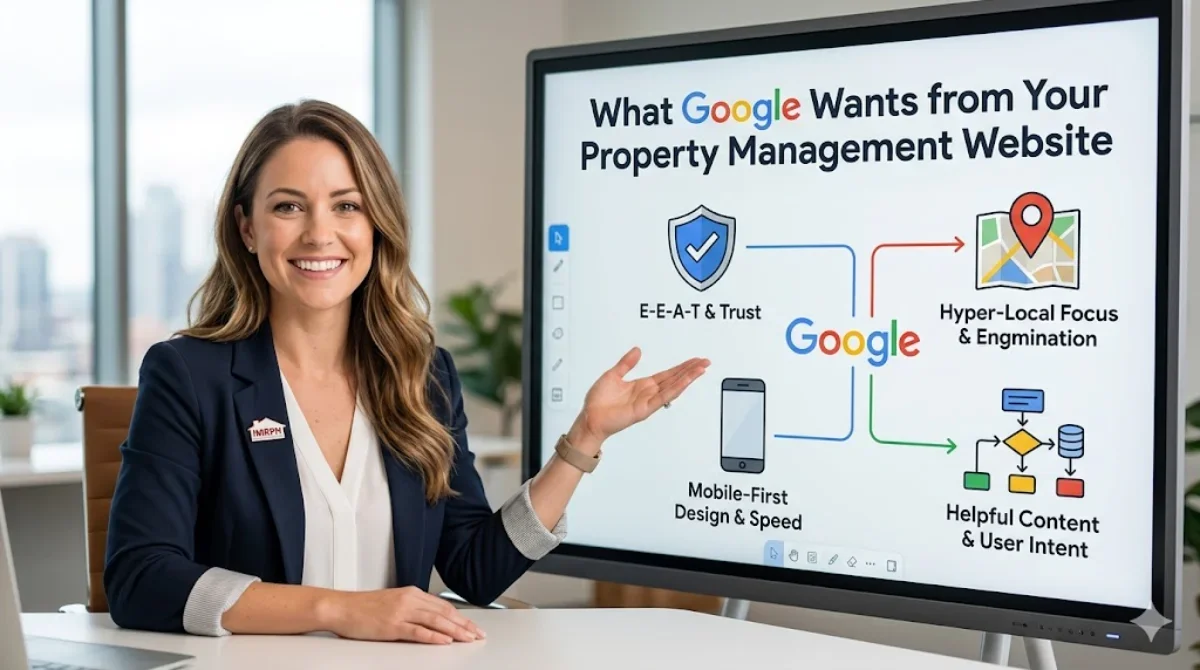
What Google Wants from Your Property Management Website
1. Mobile-First Design
Google looks at the mobile version of your site first when it decides how to index and rank it. If your property management website doesn't work well on a phone, you're starting behind.
Lots of renters search on their phones, too. Picture a tenant driving past your vacancy sign and looking up your name at a red light. They need a page that loads fast and is easy to use with one thumb.
What to check:
Does your navigation collapse cleanly on mobile?
Are your contact forms and buttons big enough to tap?
Does your listings page scroll and filter smoothly?
2. Page Speed and Core Web Vitals
Google's Core Web Vitals are part of how Google ranks pages. They measure three things: how fast your main content loads (LCP), how quickly the page responds when someone taps or clicks (INP), and how much the layout shifts around while it loads (CLS). INP replaced the older FID metric in March 2024.
Property management websites tend to struggle here. Common causes are huge listing photos, bloated page builders, and rental portal add-ons that load heavy scripts.
Quick wins:
Compress and resize all property photos
Use a CDN if your site hosts lots of photos
Cut third-party scripts where you can
Aim for an LCP under 2.5 seconds
3. Local SEO Structure
For property management, almost all of your business is local. Your service area should shape the whole site. A single mention in the footer won't cut it. Effective SEO for property management works across several channels at once.
This means:
A dedicated page for each city or neighborhood you serve
A name, address, and phone number (NAP) that match everywhere on the site and on your Google Business Profile. Local citation management software like ClearLead Local can help.
Schema markup that tells Google your local business details
Local content with real substance. A line like "we serve the greater [City] area" does very little. Pages that speak to landlords and renters in each market, built around the right property management keywords, do much more.
4. Clear Site Architecture
Google needs to understand how your pages connect. A flat, logical site structure helps Google crawl your site and helps visitors find their way.
A solid structure for most property management companies looks like this:
Homepage
├── Services
│   ├── Property Management
│   ├── Tenant Placement
│   └── Maintenance Services
├── Available Rentals
├── Owner Resources
├── Tenant Resources (portal login, maintenance requests)
├── About / Team
├── Service Areas (one page per market)
└── Blog
Try to keep your key pages within a click or two of the homepage. When Google has to dig for a page, your visitors usually do too. Between mobile speed, Core Web Vitals, local structure, and site architecture, there's a lot to track. Our property management SEO audit checklist walks through each one before you move on to what tenants and owners need to see.
What Tenants Want from Your Property Management Website
5. A Searchable, Up-to-Date Rentals Page
This is the most visited page on most property management websites. Tenants want to filter by price, bedrooms, pet policy, and location. They also expect the listings to be current.
If your vacancy page still shows homes that are already leased, or it's a plain list with no photos, you're losing leads. Pull your listings straight from your property management software (AppFolio, Buildium, RentVine, etc.) so they update on their own.
What makes a great listings page:
Good photos (we suggest 5 to 8 per unit at minimum)
Accurate pricing and move-in date
Pet policy, parking, and utilities spelled out
An "Apply Now" or "Schedule a Tour" button on every listing
6. Online Tenant Portal Access (Make It Easy to Find)
Current tenants make up a big share of your website traffic. They show up to pay rent, submit a maintenance request, or check their lease. If they have to hunt for the portal login, they get annoyed and you get a phone call.
Put your tenant portal link in the header menu where people see it right away. Label it plainly, like "Resident Login" or "Pay Rent," so nobody has to guess.
7. Trust Signals Throughout the Site
Prospective tenants are about to hand you a deposit and sign a lease. They want to feel sure you're a real, professional company first.
Trust signals include:
Real team photos (skip the stock images)
A Google Reviews widget or testimonials with real names
Licensing and memberships (NARPM membership, state license numbers)
Years in business, if you've been around a while
A response time promise, like "We respond to all inquiries within 24 hours"
A secure HTTPS website. The padlock in the browser bar is a basic trust signal. Google has used HTTPS as a ranking signal since 2014, and anyone who sees "Not Secure" in the address bar is likely to leave. If your site still runs on HTTP, fix that first.
8. Clear, Separate CTAs for Owners vs. Tenants
Your homepage gets both audiences. With one generic call to action, like "Contact Us," everyone goes down the same path and you lose track of who's reaching out and why.
Use split CTAs instead:
"I'm a Property Owner" → leads to a consultation form or owner inquiry page
"I'm Looking to Rent" → leads to your vacancy listings
This also makes your marketing attribution much cleaner.
It sets you up for testing over time, too. Once owners and tenants each have their own path, you can test button wording, form length, and headlines for each group without one audience muddying the other's numbers.
For example, changing "Get a Free Consultation" to "See What Your Property Could Earn" on the owner side is the kind of small test that can move your form completion rate.
Accessibility Note
ADA compliance is no longer optional for property management websites.
Property management companies are seeing more web accessibility lawsuits under the Americans with Disabilities Act. Your website should meet WCAG 2.1 AA standards. That includes enough color contrast, keyboard navigation, and descriptive alt text on every image.
An accessible website can also help your SEO, make the site easier to use, and show every visitor you run a professional operation. If you aren't sure whether your site is compliant, ask your developer to run an accessibility audit before your next redesign.
The Design Elements That Tie It All Together
9. Professional Branding (Not a Template That Screams "Template")
There are dozens of property management website templates out there, and many of them look the same. If your site looks like the company down the street, visitors have no reason to pick you.
Invest in:
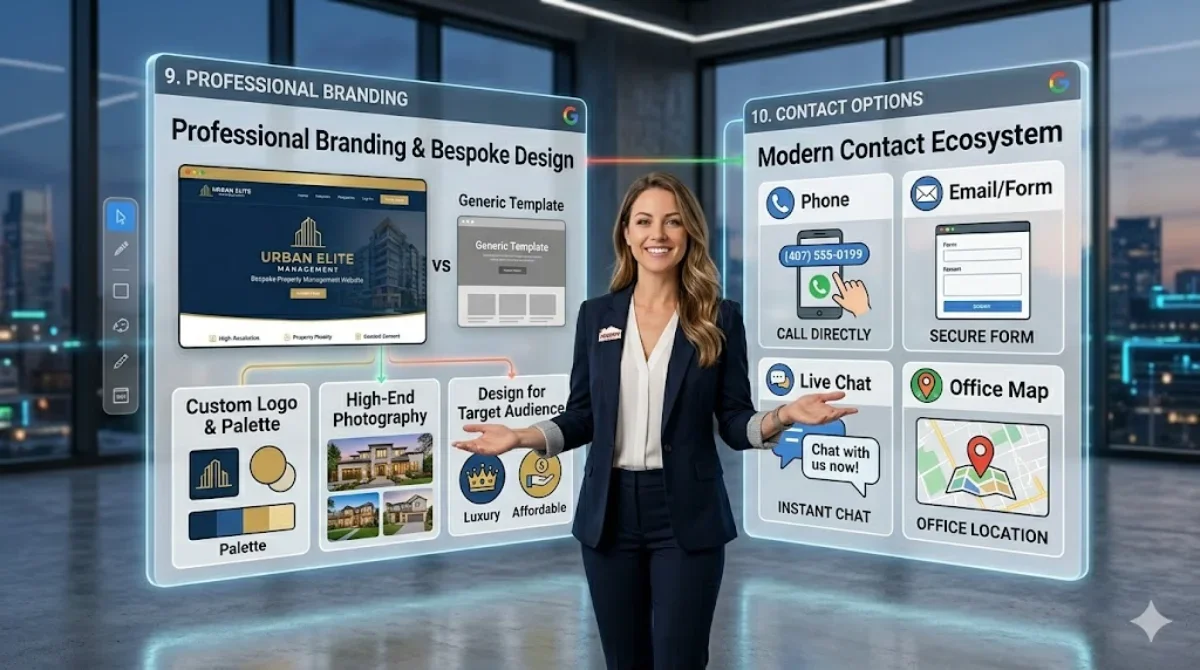
A custom logo and a consistent color palette
Professional photos of your team and the homes you manage
Fonts that read clearly on every screen size
A design that reflects the quality of the properties you manage
Match the design to your audience. A high-end rental portfolio calls for a site that feels high-end. For a company focused on affordable housing in working-class neighborhoods, an approachable and practical site will connect better.
10. Contact Options That Match How People Communicate
Plenty of people would rather not fill out a form. Give visitors several ways to reach you:
Phone number (click-to-call on mobile)
Email or contact form
Live chat (optional, but good for after-hours leads)
Your office address with a map, if you have a physical location
Should You Redesign or Refresh Your Property Management Website?
Before you overhaul everything, ask whether a full redesign is what you actually need.
A refresh makes sense if your site is built well, loads fast, and has decent content, but the design feels dated or a few key pages are underperforming. A refresh updates the visuals, tightens the copy, and fixes specific conversion gaps while leaving the foundation alone.
Go with a full redesign when your site is slow, doesn't work on phones, has no service area pages, or sits on a platform that limits your SEO. If your current site can't support what this guide covers, patching it only buys you time.
Many property management companies come to us thinking they need a redesign when a focused refresh would do the job. That usually means better CTAs, faster load times, and a few new pages. When the foundation is broken, though, new copy alone won't fix it.
Before You Redesign: Protect What Already Ranks
If your company has been around a while, your current site has history. Google already trusts some of your pages. Other sites and past clients link to them. You've earned rankings over years.
A redesign without an SEO plan can wipe that out fast. Pages get renamed, redirects get skipped, and your best page drops out of search. This happens in every industry, and property management is no exception.
That's why we tell clients to bring in their SEO team before the designer starts. Plenty of designers know SEO well, but the two jobs often pull in different directions. Designers focus on how the page looks, while your SEO team needs the right words and structure on it so people can find you.
Before you sign with a designer, ask one question: "What's the plan for my existing pages?"
A good answer covers:
A list of every current URL and which ones get traffic or links
A 301 redirect for every page that changes or goes away
Internal links updated to point at the new URLs
Page titles and content on your top pages kept or improved
A check after launch to catch broken links and lost rankings
If you get a blank stare, call an SEO first.
When in doubt, start with a free website audit to see what's holding your site back before you commit to either path.
FAQ: Property Management Website Design
-
A custom property management website often runs about $3,000 to $10,000, depending on the number of pages, integrations, and design work. Template builds cost less (roughly $500 to $2,000), but they usually give up uniqueness and integration quality.
-
The most common integrations are AppFolio, Buildium, RentVine, Propertyware, and Rent Manager. Your website builder should be able to embed vacancy feeds, tenant portals, and maintenance request forms directly from whichever platform you use.
-
At minimum, your vacancy listings should update in real time through your PM software integration. For general content — service pages, team pages, blog — a quarterly review is a good baseline. Google favors sites that show consistent updates over time.
-
Yes, if you want to rank locally in each of those markets. A single "we serve all of Central Florida" paragraph won't rank in individual city searches. You need dedicated, substantive pages for each service area.
-
Focusing on aesthetics over function. A beautiful website that doesn't clearly tell a tenant how to apply for a rental, or doesn't tell an owner how to get a free consultation, isn't doing its job. Design should serve conversion, not the other way around.
Related Reading: Average Property Management Fees
Final Thoughts: Treat Your Website Like a Leasing Tool
The best property management websites look professional and do real work for the business. They rank for local searches, load fast on phones, make it easy for tenants to apply and pay rent, and give owners a reason to trust you with their investment.
If your current site falls short on any of that, it's worth a hard look. Whether you need a full rebuild or a few targeted fixes, a well-built property management website is usually worth the investment.
Ready to see what your website is actually costing you? Request a Strategy Call from ClearLead Digital and we'll show you exactly where you're leaving leads on the table.
Next Step Resource: Property Management SEO Audit Checklist